File Payments v3.1.2
Version Control
Version | Date | Author | Comments |
|---|---|---|---|
| 3.1 | OB R/W API Team | This is the baseline version. | |
| v4.0-draft1 | OB R/W API Team | Errata:
| |
| v4.0-draft6 | OB R/W API Team | v4.0-draft6 changes:
| |
| 4.0-draft7 | OB R/W API Team | v4.0-draft7 changes:
|
Basics
Overview
File Payments allow a file of payments to be uploaded to an ASPSP for payment initiation.
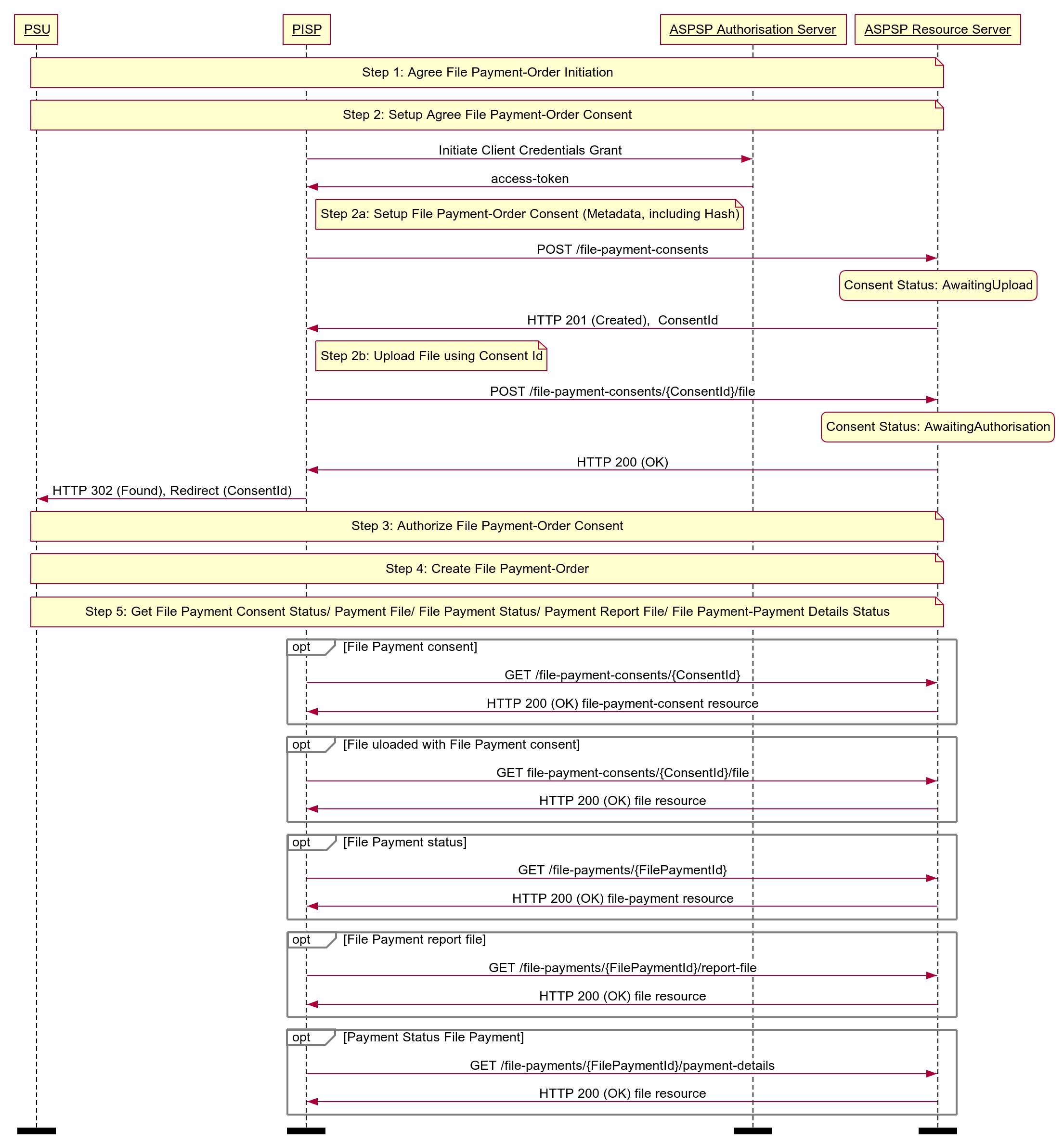
The high-level flow for file-payments follow the flow for all other payment-order types (as described in the Basic > Overview Section of Payment Initiation API Specification) however, with an additional step to upload the file. The step for staging the payment-order consent is broken into two steps:
- POST metadata of the file-payment for payment initiation.
- POST the file of the file-payment for payment initiation.
Steps
Step 1: Agree File Payment-Order Initiation.
Step 2a: Setup File Payment-Order Consent (Metadata):
- The PISP connects to the ASPSP that services the PSU's payment account and creates a new file-payment-consent resource. This JSON message contains the Metadata of the file payments file. The ASPSP responds with a ConsentId.
- This step is carried out by making a POST request to the file-payment-consent resource.
Step 2b: Setup File Payment-Order Consent (Upload File):
- The PISP uploads the payment file to the file-payment-consent endpoint with ConsentId obtained in Step 2a.
- ASPSP verifies the payment file against the hash of payment file received in the file-payment-consent Metadata in Step 2a.
- ASPSP responds with 200 OK.
- This step completes the file-payment-consent creation.
Step 3: Authorise Consent.
Step 4: Create Payment-Order.
Step 5: Get Consent/Payment-Order/Payment-Details Status:
- A PISP may optionally request the Status of the file-payment-consent.
- A PISP may optionally request File uploaded to file-payment-consent, for verification.
- A PISP may optionally request the Status of the file-payment.
- A PISP may optionally request a report in a file format, on the status of the individual payments in file-payments, if the ASPSP makes this available.
- A PISP may optionally request the detail status of the individual payments in file-payments, if the ASPSP makes this available.
Sequence Diagram
Endpoints
| Resource | HTTP Operation | Endpoint | Mandatory ? | Scope | Grant Type | Message Signing | Idempotency Key | Request Object | Response Object |
|---|---|---|---|---|---|---|---|---|---|
| file-payment-consents | POST | POST /file-payment-consents | Conditional | payments | Client Credentials | Signed Request Signed Response | Yes | OBWriteFileConsent3 | OBWriteFileConsentResponse3 |
| file-payment-consents | POST | POST /file-payment-consents/{ConsentId}/file | Conditional | payments | Client Credentials | Signed Request Signed Response | Yes | File | NA |
| file-payment-consents | GET | GET /file-payment-consents/{ConsentId} | Mandatory (if resource POST implemented) | payments | Client Credentials | Signed Response | No | NA | OBWriteFileConsentResponse3 |
| file-payment-consents | GET | GET /file-payment-consents/{ConsentId}/file | Conditional | payments | Client Credentials | Signed Response | No | NA | File |
| file-payments | POST | POST /file-payments | Conditional | payments | Authorization Code | Signed Request Signed Response | Yes | OBWriteFile2 | OBWriteFileResponse2 |
| file-payments | GET | GET /file-payments/{FilePaymentId} | Mandatory (if resource POST implemented) | payments | Client Credentials | Signed Response | No | NA | OBWriteFileResponse2 |
| file-payments | GET | GET /file-payments/{FilePaymentId}/report-file | Conditional | payments | Client Credentials | Signed Response | No | NA | File |
| payment-details | GET | GET /file-payments/{FilePaymentId}/payment-details | Optional | payments | Client Credentials | Signed Response | No | NA | OBWritePaymentDetailsResponse1 |
POST /file-payment-consents
POST /file-payment-consents
The API endpoint allows the PISP to ask an ASPSP to create a new file-payment-consent resource.
- The POST action indicates to the ASPSP that a file payment consent has been staged. At this point, the PSU may not have been identified by the ASPSP and the request payload may not contain any information of the account(s) that should be debited.
- The endpoint allows the PISP to send metadata of the consent (between PSU and PISP) to the ASPSP.
- The metadata of the consent must include the FileType of the request.
- The metadata of the consent must include the FileHash, which is a base64 encoding of a SHA256 hash of the file to be uploaded.
- The ASPSP creates the file-payment-consent resource and responds with a unique ConsentId to refer to the resource.
Status
The default Status is "AwaitingUpload" immediately after the file-payment-consent has been created.
| Status |
|---|
| AwaitingUpload |
POST /file-payment-consents/{ConsentId}/file
POST /file-payment-consents/{ConsentId}/file
The API endpoint allows the PISP to upload a file to an ASPSP, against a file-payment-consent resource.
- The endpoint allows the PISP to send a copy of the consent (between PSU and PISP) to the ASPSP for the PSU to authorise. The PISP must upload the file against the ConsentId before redirecting the PSU to authorise the consent.
- The file structure must match the FileType in the file-payment-consent request.
- An ASPSP must confirm the hash of the file matches with the FileHash provided in the file-payment-consent Metadata.
- The metadata for the file-payment-consent must match the contents of the uploaded file:
- If the content of the metadata does not match the content of the file, the ASPSP must reject the file-payment-consent.
- The file is sent in the HTTP request body.
- HTTP headers (e.g. Content-Type) are used to describe the file.
Status
The default Status is "AwaitingAuthorisation" immediately after the file has been uploaded.
| Status |
|---|
| AwaitingAuthorisation |
GET /file-payment-consents/{ConsentId}
GET /file-payment-consents/{ConsentId}
A PISP can optionally retrieve a payment consent resource that they have created to check its status.
Status
Once the PSU authorises the payment-consent resource, the Status of the payment-consent resource will be updated with "Authorised".
If the PSU rejects the consent or the file-payment-consent has failed some other ASPSP validation, the Status will be set to "Rejected".
Once a file-payment has been successfully created using the file-payment-consent, the Status of the file-payment-consent will be set to "Consumed".
The available Status codes for the file-payment-consent resource are:
| Status |
|---|
| AwaitingUpload |
| AwaitingAuthorisation |
| Rejected |
| Authorised |
| Consumed |
GET /file-payment-consents/{ConsentId}/file
GET /file-payment-consents/{ConsentId}/file
The API endpoint allows the PISP to download a file (that had been uploaded against a file-payment-consent resource) from an ASPSP.
- The file is sent in the HTTP response body.
- HTTP headers (e.g. Content-Type) are used to describe the file.
POST /file-payments
POST /file-payments
Once the file-payment-consent has been authorised by the PSU, the PISP can proceed to submit the file-payment for processing:
- This is done by making a POST request to the file-payments endpoint.
- This request is an instruction to the ASPSP to begin the file payment journey. The PISP must submit the file payment immediately, however, there are some scenarios where the ASPSP may not stage the file payment immediately (e.g. busy periods at the ASPSP).
- The PISP must ensure that the Initiation section of the file-payment match the corresponding Initiation section of the file-payment-consent resource. If the two do not match, the ASPSP must not process the request and must respond with a 400 (Bad Request).
- Any operations on the file-payment resource will not result in a Status change for the file-payment resource.
The file-payments resource that is created successfully, must have one of the following Status codes:
| Status |
|---|
| InitiationPending |
| InitiationFailed |
| InitiationCompleted |
GET /file-payments/{FilePaymentId}
GET /file-payments/{FilePaymentId}
A PISP can retrieve the file-payment to check its status.
Status
The file-payments resource must have one of the following Status codes:
| Status |
|---|
| InitiationPending |
| InitiationFailed |
| InitiationCompleted |
GET /file-payments/{FilePaymentId}/report-file
GET /file-payments/{FilePaymentId}/report-file
The API endpoint allows the PISP to download a payment report file from an ASPSP.
- This endpoint enables ASPSP to return a report on the processing results of Payments in the file
- The file is sent in the HTTP response body.
- The file structure may match a payment execution report for the corresponding FileType in the file-payment-consent request.
- HTTP headers (e.g. Content-Type) are used to describe the file.
GET /file-payments/{FilePaymentId}/payment-details
GET /file-payments/{FilePaymentId}/payment-details
A PISP can retrieve the Details of the underlying payment transaction(s) via this endpoint. This resource allows ASPSPs to return richer list of Payment Statuses, and if available payment scheme related statuses.
Status
The file-payments - payment-details must have one of the following PaymentStatusCode code-set enumerations:
Status |
|---|
| Accepted |
| AcceptedCancellationRequest |
| AcceptedTechnicalValidation |
| AcceptedCustomerProfile |
| AcceptedFundsChecked |
| AcceptedWithChange |
| Pending |
| Rejected |
| AcceptedSettlementInProcess |
| AcceptedSettlementCompleted |
| AcceptedWithoutPosting |
| AcceptedCreditSettlementCompleted |
| Cancelled |
| NoCancellationProcess |
| PartiallyAcceptedCancellationRequest |
| PartiallyAcceptedTechnicalCorrect |
| PaymentCancelled |
| PendingCancellationRequest |
| Received |
| RejectedCancellationRequest |
State Model
Payment Order Consent
The state model for the file-payment-consent resource follows the generic consent state model. However, does not use the "Revoked" status, as the consent for a file-payment is not a long-lived consent.
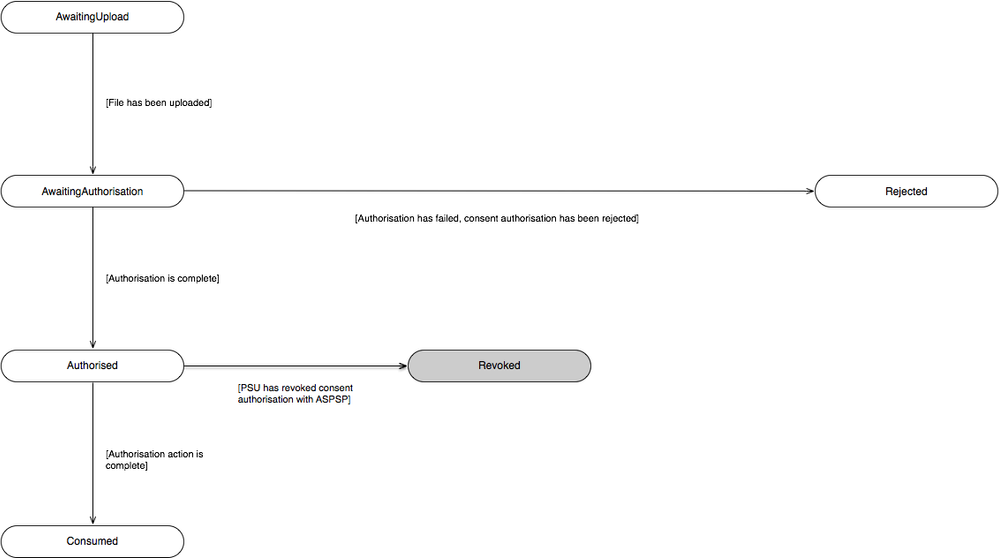
The definitions for the Status:
| Status | Status Description | |
|---|---|---|
| 1 | AwaitingUpload | The file for the consent resource is awaiting upload. |
| 2 | AwaitingAuthorisation | The consent resource is awaiting PSU authorisation. |
| 3 | Rejected | The consent resource has been rejected. |
| 4 | Authorised | The consent resource has been successfully authorised. |
| 5 | Consumed | The consented action has been successfully completed. This does not reflect the status of the consented action. |
Payment Order
The state model for the file-payments resource describes the initiation status only. I.e., not the subsequent execution of the file-payments.

The definitions for the Status:
| Status | Payment Status Description | |
|---|---|---|
| 1 | InitiationPending | The initiation of the payment order is pending. |
| 2 | InitiationFailed | The initiation of the payment order has failed. |
| 3 | InitiationCompleted | The initiation of the payment order is complete. |
Multiple Authorisation
If the payment-order requires multiple authorisations the Status of the multiple authorisations will be updated in the MultiAuthorisation object.
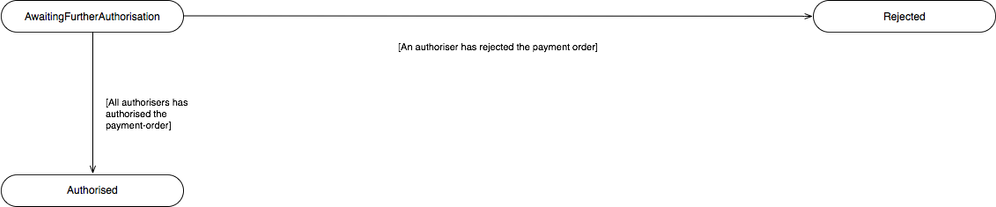
The definitions for the Status:
| Status | Status Description | |
|---|---|---|
| 1 | AwaitingFurtherAuthorisation | The payment-order resource is awaiting further authorisation. |
| 2 | Rejected | The payment-order resource has been rejected by an authoriser. |
| 3 | Authorised | The payment-order resource has been successfully authorised by all required authorisers. |
Data Model
The data dictionary section gives the detail on the payload content for the File Payment API flows.
Reused Classes
OBFile2
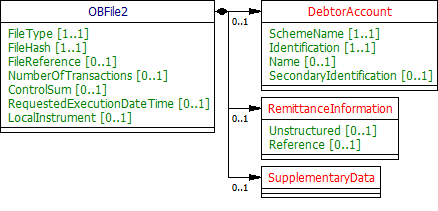
This section describes the OBFile2 class, which is reused as the Initiation object in the file-payment-consent and file-payment resources.
UML Diagram
Notes
For the OBFile2 Initiation object:
- All elements in the Initiation payload that are specified by the PISP must not be changed via the ASPSP, as this is part of formal consent from the PSU.
If the ASPSP is able to establish a problem with payload or any contextual error during the API call, the ASPSP must reject the file-payment-consent request immediately.
If the ASPSP establishes a problem with the file-payment-consent after the API call, the ASPSP must set the Status of the file-payment-consent resource to Rejected.
- The DebtorAccount is optional as the PISP may not know the account identification details for the PSU.
- If the DebtorAccount is specified by the PISP and is invalid for the PSU - then the file-payment-consent will be set to Rejected after PSU authentication.
- An ASPSP may choose which fields must be populated to process a specified FileType, and may reject the request if the fields are not populated. These ASPSP specific requirements must be documented.
- An ASPSP may choose which fields must not be populated to process a specified FileType, and may reject the request if the fields are populated. These ASPSP specific requirements must be documented.
Data Dictionary
| Name | Occurrence | XPath | EnhancedDefinition | Class | Codes | Pattern |
|---|---|---|---|---|---|---|
OBFile2 | OBFile2 | The Initiation payload is sent by the initiating party to the ASPSP. It is used to request movement of funds using a payment file. | OBFile2 | |||
FileType | 1..1 | OBFile2/FileType | Specifies the payment file type. | Max40Text | ||
FileHash | 1..1 | OBFile2/FileHash | A base64 encoding of a SHA256 hash of the file to be uploaded. | Max44Text | ||
FileReference | 0..1 | OBFile2/FileReference | Reference for the file. | Max40Text | ||
NumberOfTransactions | 0..1 | OBFile2/NumberOfTransactions | Number of individual transactions contained in the payment information group. | Max15NumericText | [0-9]{1,15} | |
ControlSum | 0..1 | OBFile2/ControlSum | Total of all individual amounts included in the group, irrespective of currencies. | DecimalNumber | ||
RequestedExecutionDateTime | 0..1 | OBFile2/RequestedExecutionDateTime | Date at which the initiating party requests the clearing agent to process the payment. Usage: This is the date on which the debtor's account is to be debited. | ISODateTime | ||
LocalInstrument | 0..1 | OBFile2/LocalInstrument | User community specific instrument. Usage: This element is used to specify a local instrument, local clearing option and/or further qualify the service or service level. | OBExternalLocalInstrument1Code | ||
DebtorAccount | 0..1 | OBFile2/DebtorAccount | Unambiguous identification of the account of the debtor to which a debit entry will be made as a result of the transaction. | OBCashAccountDebtor4 | ||
SchemeName | 1..1 | OBFile2/DebtorAccount/SchemeName | Name of the identification scheme, in a coded form as published in an external list. | OBExternalAccountIdentification4Code | ||
Identification | 1..1 | OBFile2/DebtorAccount/Identification | Identification assigned by an institution to identify an account. This identification is known by the account owner. | Max256Text | ||
Name | 0..1 | OBFile2/DebtorAccount/Name | The account name is the name or names of the account owner(s) represented at an account level, as displayed by the ASPSP's online channels. Note, the account name is not the product name or the nickname of the account. | Max70Text | ||
SecondaryIdentification | 0..1 | OBFile2/DebtorAccount/SecondaryIdentification | This is secondary identification of the account, as assigned by the account servicing institution. This can be used by building societies to additionally identify accounts with a roll number (in addition to a sort code and account number combination). | Max34Text | ||
RemittanceInformation | 0..1 | OBFile2/RemittanceInformation | Information supplied to enable the matching of an entry with the items that the transfer is intended to settle, such as commercial invoices in an accounts' receivable system. | OBRemittanceInformation1 | ||
Unstructured | 0..1 | OBFile2/RemittanceInformation/Unstructured | Information supplied to enable the matching/reconciliation of an entry with the items that the payment is intended to settle, such as commercial invoices in an accounts' receivable system, in an unstructured form. | Max140Text | ||
Reference | 0..1 | OBFile2/RemittanceInformation/Reference | Unique reference, as assigned by the creditor, to unambiguously refer to the payment transaction. Usage: If available, the initiating party should provide this reference in the structured remittance information, to enable reconciliation by the creditor upon receipt of the amount of money. If the business context requires the use of a creditor reference or a payment remit identification, and only one identifier can be passed through the end-to-end chain, the creditor's reference or payment remittance identification should be quoted in the end-to-end transaction identification. OB: The Faster Payments Scheme can only accept 18 characters for the ReferenceInformation field - which is where this ISO field will be mapped. | Max35Text | ||
SupplementaryData | 0..1 | OBFile2/SupplementaryData | Additional information that can not be captured in the structured fields and/or any other specific block. | OBSupplementaryData1 |
File Payment Consent - Request
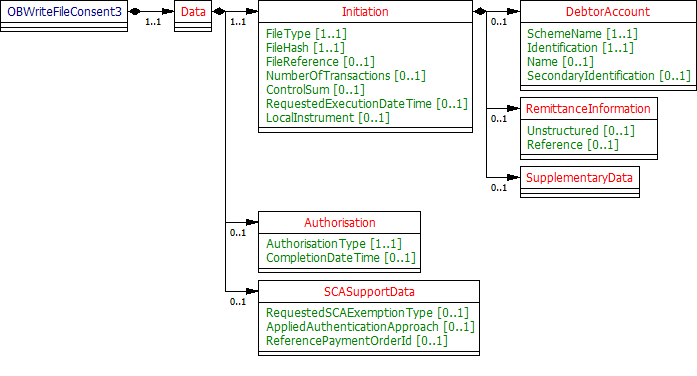
The OBWriteFileConsent3 object will be used for the call to:
- POST /file-payment-consents
UML Diagram
Notes
The file-payment-consent request contains these objects:
- Initiation
- Authorisation
- SCASupportData.
For the file-payment-consent request object:
- There is no Risk section in the OBWriteFileConsent3 object - as this is not relevant for a file payment.
Data Dictionary
| Name | Occurrence | XPath | EnhancedDefinition | Class | Codes | Pattern |
|---|---|---|---|---|---|---|
| OBWriteFileConsent3 | OBWriteFileConsent3 | OBWriteFileConsent3 | ||||
| Data | 1..1 | OBWriteFileConsent3/Data | OBWriteDataFileConsent3 | |||
| Initiation | 1..1 | OBWriteFileConsent3/Data/Initiation | The Initiation payload is sent by the initiating party to the ASPSP. It is used to request movement of funds using a payment file. | OBFile2 | ||
| Authorisation | 0..1 | OBWriteFileConsent3/Data/Authorisation | The authorisation type request from the TPP. | OBAuthorisation1 | ||
SCASupportData | 0..1 | OBWriteFileConsent3/Data/SCASupportData | Supporting Data provided by TPP, when requesting SCA Exemption. | OBSCASupportData1 |
File Payment Consent - Response
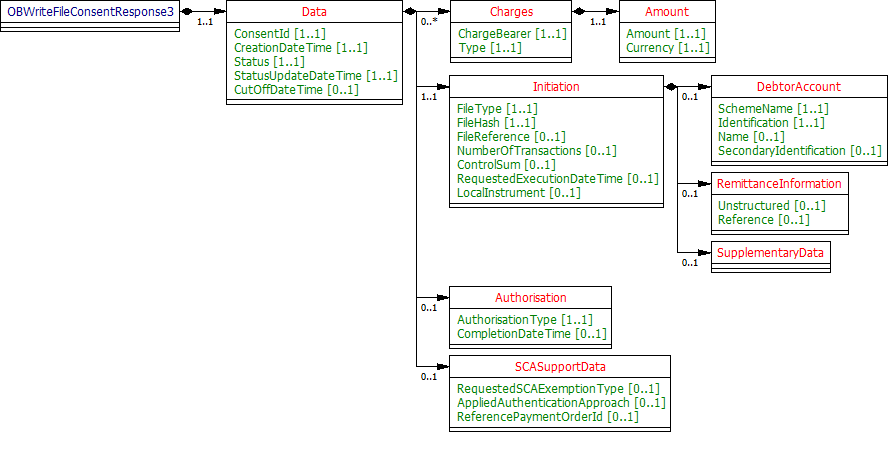
The OBWriteFileConsentResponse3 object will be used for a response to a call to:
- POST /file-payment-consents
- GET /file-payment-consents/{ConsentId}
UML Diagram
Notes
The file-payment-consent response contains the full original payload from the file-payment-consent request with these additional elements:
- ConsentId.
- CreationDateTime the file-payment-consent resource was created.
- Status and StatusUpdateDateTime of the file-payment-consent resource.
- CutOffDateTime Behaviour is explained in Payment Initiation API Specification, Section - Payment Restrictions -> CutOffDateTime API Behaviour.
- Charges array - for the breakdown of applicable ASPSP charges.
Data Dictionary
| Name | Occurrence | XPath | EnhancedDefinition | Class | Codes | Pattern |
|---|---|---|---|---|---|---|
| OBWriteFileConsentResponse3 | OBWriteFileConsentResponse3 | OBWriteFileConsentResponse3 | ||||
| Data | 1..1 | OBWriteFileConsentResponse3/Data | OBWriteDataFileConsentResponse3 | |||
| ConsentId | 1..1 | OBWriteFileConsentResponse3/Data/ConsentId | OB: Unique identification as assigned by the ASPSP to uniquely identify the consent resource. | Max128Text | ||
| CreationDateTime | 1..1 | OBWriteFileConsentResponse3/Data/CreationDateTime | Date and time at which the resource was created. | ISODateTime | ||
| Status | 1..1 | OBWriteFileConsentResponse3/Data/Status | Specifies the status of consent resource in code form. | OBExternalConsentStatus2Code | Authorised AwaitingAuthorisation AwaitingUpload Consumed Rejected | |
| StatusUpdateDateTime | 1..1 | OBWriteFileConsentResponse3/Data/StatusUpdateDateTime | Date and time at which the consent resource status was updated. | ISODateTime | ||
| CutOffDateTime | 0..1 | OBWriteFileConsentResponse3/Data/CutOffDateTime | Specified cut-off date and time for the payment consent. | ISODateTime | ||
| Charges | 0..n | OBWriteFileConsentResponse3/Data/Charges | Set of elements used to provide details of a charge for the payment initiation. | OBCharge2 | ||
| Initiation | 1..1 | OBWriteFileConsentResponse3/Data/Initiation | The Initiation payload is sent by the initiating party to the ASPSP. It is used to request movement of funds using a payment file. | OBFile2 | ||
| Authorisation | 0..1 | OBWriteFileConsentResponse3/Data/Authorisation | The authorisation type request from the TPP. | OBAuthorisation1 | ||
SCASupportData | 0..1 | OBWriteFileConsentResponse3/Data/SCASupportData | Supporting Data provided by TPP, when requesting SCA Exemption. | OBSCASupportData1 |
File Payment - Request
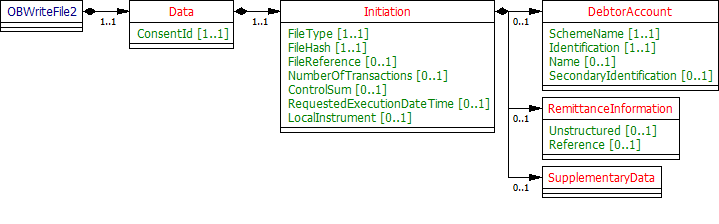
The OBWriteFile2 object will be used for a call to:
- POST /file-payments
UML Diagram
Notes
The file-payment request object contains the:
- ConsentId.
- The full Initiation object from the file-payment-consent request.
The Initiation section of the file-payment request must match the Initiation section of the corresponding file-payment-consent request.
Data Dictionary
| Name | Occurrence | XPath | EnhancedDefinition | Class | Codes | Pattern |
|---|---|---|---|---|---|---|
| OBWriteFile2 | OBWriteFile2 | OBWriteFile2 | ||||
| Data | 1..1 | OBWriteFile2/Data | OBWriteDataFile2 | |||
| ConsentId | 1..1 | OBWriteFile2/Data/ConsentId | OB: Unique identification as assigned by the ASPSP to uniquely identify the consent resource. | Max128Text | ||
| Initiation | 1..1 | OBWriteFile2/Data/Initiation | The Initiation payload is sent by the initiating party to the ASPSP. It is used to request movement of funds using a payment file. | OBFile2 |
File Payment - Response
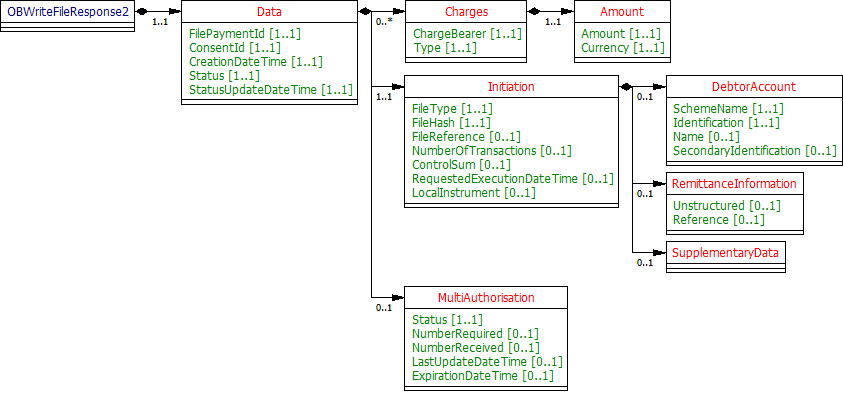
The OBWriteFileResponse2 object will be used for a response to a call to:
- POST /file-payments
- GET /file-payments/{FilePaymentId}
UML Diagram
Notes
The file-payment response object contains the:
- FilePaymentId.
- ConsentId.
- CreationDateTime the file-payment resource was created.
- Status and StatusUpdateDateTime of the file-payment resource.
- Charges array is used for the breakdown of applicable ASPSP charges.
- The Initiation object from the file-payment-consent.
- The MultiAuthorisation object if the file-payment resource requires multiple authorisations.
Data Dictionary
| Name | Occurrence | XPath | EnhancedDefinition | Class | Codes | Pattern |
|---|---|---|---|---|---|---|
| OBWriteFileResponse2 | OBWriteFileResponse2 | OBWriteFileResponse2 | ||||
| Data | 1..1 | OBWriteFileResponse2/Data | OBWriteDataFileResponse2 | |||
| FilePaymentId | 1..1 | OBWriteFileResponse2/Data/FilePaymentId | OB: Unique identification as assigned by the ASPSP to uniquely identify the file payment resource. | Max40Text | ||
| ConsentId | 1..1 | OBWriteFileResponse2/Data/ConsentId | OB: Unique identification as assigned by the ASPSP to uniquely identify the consent resource. | Max128Text | ||
| CreationDateTime | 1..1 | OBWriteFileResponse2/Data/CreationDateTime | Date and time at which the message was created. | ISODateTime | ||
| Status | 1..1 | OBWriteFileResponse2/Data/Status | Specifies the status of the payment order resource. | OBExternalStatus1Code | InitiationCompleted InitiationFailed InitiationPending | |
| StatusUpdateDateTime | 1..1 | OBWriteFileResponse2/Data/StatusUpdateDateTime | Date and time at which the resource status was updated. | ISODateTime | ||
| Charges | 0..n | OBWriteFileResponse2/Data/Charges | Set of elements used to provide details of a charge for the payment initiation. | OBCharge2 | ||
| Initiation | 1..1 | OBWriteFileResponse2/Data/Initiation | The Initiation payload is sent by the initiating party to the ASPSP. It is used to request movement of funds using a payment file. | OBFile2 | ||
| MultiAuthorisation | 0..1 | OBWriteFileResponse2/Data/MultiAuthorisation | The multiple authorisation flow response from the ASPSP. | OBMultiAuthorisation1 |
Domestic Payment Order - Payment Details - Response
The OBWritePaymentDetailsResponse1 object will be used for a response to a call to:
- GET /file-payments/{FilePaymentId}/payment-details
UML Diagram

Data Dictionary
Name | Occurrence | XPath | EnhancedDefinition | Class | Codes | Pattern |
|---|---|---|---|---|---|---|
| OBWritePaymentDetailsResponse1 | OBWritePaymentDetailsResponse1 | OBWritePaymentDetailsResponse1 | ||||
| Data | 1..1 | OBWritePaymentDetailsResponse1/Data | OBWriteDataPaymentOrderStatusResponse1 | |||
| PaymentStatus | 0..unbounded | OBWritePaymentDetailsResponse1/Data/PaymentStatus | Payment status details. | OBWritePaymentDetails1 |
Usage Examples
Setup File Payment Consent
This is an API call by the PISP to create the file-payment-consent metadata.
POST /file-payment-consents request
POST /file-payment-consents HTTP/1.1
Authorization: Bearer 2YotnFZFEjr1zCsicMWpAA
x-idempotency-key: FRESCO.21302.GFX.20
x-jws-signature: TGlmZSdzIGEgam91cm5leSBub3QgYSBkZXN0aW5hdGlvbiA=..T2ggZ29vZCBldmVuaW5nIG1yIHR5bGVyIGdvaW5nIGRvd24gPw==
x-fapi-auth-date: Sun, 10 Sep 2017 19:43:31 UTC
x-fapi-customer-ip-address: 104.25.212.99
x-fapi-interaction-id: 93bac548-d2de-4546-b106-880a5018460d
Content-Type: application/json
Accept: application/json

{
  "Data": {
    "Initiation": {
      "FileType": "UK.OBIE.pain.001.001.08",
      "FileHash": "m5ah/h1UjLvJYMxqAoZmj9dKdjZnsGNm+yMkJp/KuqQ",
      "FileReference": "GB2OK238",
      "NumberOfTransactions": "100",
      "ControlSum": 3459.30
    }
  }
}
POST /file-payment-consents Response
HTTP/1.1 201 Created
x-jws-signature: V2hhdCB3ZSBnb3QgaGVyZQ0K..aXMgZmFpbHVyZSB0byBjb21tdW5pY2F0ZQ0K
x-fapi-interaction-id: 93bac548-d2de-4546-b106-880a5018460d
Content-Type: application/json

{
  "Data": {
    "ConsentId" : "512345",
    "Status": "AwaitingUpload",
    "CreationDateTime": "2018-06-05T15:15:13+00:00",
    "StatusUpdateDateTime": "2018-06-05T15:15:13+00:00",
    "Initiation": {
      "FileType": "UK.OBIE.pain.001.001.08",
      "FileHash": "m5ah/h1UjLvJYMxqAoZmj9dKdjZnsGNm+yMkJp/KuqQ",
      "FileReference": "GB2OK238",
      "NumberOfTransactions": "100",
      "ControlSum": 3459.30
    }
  },
  "Links":{
    "Self":"https://api.alphabank.com/open-banking/v4.0/pisp/file-payment-consents/512345"
  },
  "Meta":{}
}
Upload File to for the File Payment Consent
Once the metadata has been accepted by the ASPSP, the PISP may post the file to the file endpoint.
The file should conform to the XML ISO20022 pain.001.001.08 format.
POST /file-payment-consents/{ConsentId}/file Request
POST /file-payment-consents/512345/file HTTP/1.1
Authorization: Bearer 2YotnFZFEjr1zCsicMWpAA
x-idempotency-key: FRESCO.21302.GFX.20
x-jws-signature: TGlmZSdzIGEgam91cm5leSBub3QgYSBkZXN0aW5hdGlvbiA=..T2ggZ29vZCBldmVuaW5nIG1yIHR5bGVyIGdvaW5nIGRvd24gPw==
x-fapi-auth-date: Sun, 10 Sep 2017 19:43:31 UTC
x-fapi-customer-ip-address: 104.25.212.99
x-fapi-interaction-id: 93bac548-d2de-4546-b106-880a5018460d
Content-Type: text/xml
Accept: application/json

[File-Data]
A sample file with 3 transactions is provided below:
POST /file-payment-consents/{ConsentId}/file Response
HTTP/1.1 200 OK
x-fapi-interaction-id: 93bac548-d2de-4546-b106-880a5018460d
Submit the File Payment after Authorisation
Once the metadata and file are both attached to the consent, and the user is able to authorise the consent.
The PISP must POST the file-payment resource to submit the file-payment for execution. The JSON message is signed.
POST /file-payments Request
POST /file-payments HTTP/1.1
Authorization: Bearer 2YotnFZFEjr1zCsicMWpAA
x-idempotency-key: FRESCO.21302.GFX.20
x-jws-signature: TGlmZSdzIGEgam91cm5leSBub3QgYSBkZXN0aW5hdGlvbiA=..T2ggZ29vZCBldmVuaW5nIG1yIHR5bGVyIGdvaW5nIGRvd24gPw==
x-fapi-auth-date: Sun, 10 Sep 2017 19:43:31 UTC
x-fapi-customer-ip-address: 104.25.212.99
x-fapi-interaction-id: 93bac548-d2de-4546-b106-880a5018460d
Content-Type: application/json
Accept: application/json

{
  "Data": {
    "ConsentId":"512345",
    "Initiation": {
      "FileType": "UK.OBIE.pain.001.001.08",
      "FileHash": "m5ah/h1UjLvJYMxqAoZmj9dKdjZnsGNm+yMkJp/KuqQ",
      "FileReference": "GB2OK238",
      "NumberOfTransactions": "100",
      "ControlSum": 3459.30
    }
  }
}
POST /file-payments Response
HTTP/1.1 201 Created
x-jws-signature: V2hhdCB3ZSBnb3QgaGVyZQ0K..aXMgZmFpbHVyZSB0byBjb21tdW5pY2F0ZQ0K
x-fapi-interaction-id: 93bac548-d2de-4546-b106-880a5018460d
Content-Type: application/json

{
  "Data": {
    "ConsentId" : "512345",
	"FilePaymentId":"FP1-512345",
    "Status": "InitiationPending",
    "CreationDateTime": "2018-06-05T15:15:13+00:00",
    "StatusUpdateDateTime": "2018-06-05T15:15:13+00:00",
    "Initiation": {
      "FileType": "UK.OBIE.pain.001.001.08",
      "FileHash": "m5ah/h1UjLvJYMxqAoZmj9dKdjZnsGNm+yMkJp/KuqQ",
      "FileReference": "GB2OK238",
      "NumberOfTransactions": "100",
      "ControlSum": 3459.30
    }
  },
  "Links":{
     "Self":"https://api.alphabank.com/open-banking/v4.0/pisp/file-payments/FP1-512345"
  },
  "Meta":{}
}
Upload File in the UK.OBIE.PaymentInitiation.4.0 format to the File Payment Consent
Steps:
- Stage the File Payment Consent with "FileType": "UK.OBIE.PaymentInitiation.4.0".
- Upload the File with payments in UK.OBIE.PaymentInitiation.v4.0 format, as described below.
POST /file-payment-consents/{ConsentId}/file Request
POST /file-payment-consents/512346/file HTTP/1.1
Authorization: Bearer 2YotnFZFEjr1zCsicMWpAA
x-idempotency-key: FRESCO.21302.GFX.20
x-jws-signature: TGlmZSdzIGEgam91cm5leSBub3QgYSBkZXN0aW5hdGlvbiA=..T2ggZ29vZCBldmVuaW5nIG1yIHR5bGVyIGdvaW5nIGRvd24gPw==
x-fapi-auth-date: Sun, 10 Sep 2017 19:43:31 UTC
x-fapi-customer-ip-address: 104.25.212.99
x-fapi-interaction-id: 93bac548-d2de-4546-b106-880a5018460d
Content-Type: application/json
Accept: application/json

[ File Data ]
A sample file with 3 Domestic Payments - CHAPS, BACS and one unspecified is provided below:
POST /file-payment-consents/{ConsentId}/file Response
HTTP/1.1 200 OK
x-fapi-interaction-id: 93bac548-d2de-4546-b106-880a5018460d
© Open Banking Limited 2019 | https://www.openbanking.org.uk/open-licence | https://www.openbanking.org.uk