Payment Initiation API Specification - v3.1.1
- Beejal Nagar (Unlicensed)
- Freddi Gyara (Unlicensed)
Version Control
| Version | Date | Author | Comments |
|---|---|---|---|
| 3.0 | OB R/W API Team | This is the baseline version. No change from RC3. Swagger URLs have been updated to point to the latest stable version. | |
| 3.1-draft1 | OB R/W API Team | This is the initial draft version for 3.1. Errata
| |
| 3.1-draft2 | OB R/W API Team | Draft2 Changes:
| |
| 3.1-draft3 | OB R/W API Team | Draft3 Changes:
Errata
| |
| 3.1-draft4 | OB R/W API Team | Draft4 Changes:
| |
| 3.1-rc1 | OB R/W API Team | RC1 Changes:
| |
| 3.1 | OB R/W API Team | Version 3.1 final release. No changes from Version 3.1 RC1. Updated swagger links to latest release candidate. | |
| 3.1.1-draft1 | OB R/W API Team | v3.1.1 RC1 changes:
|
Overview
This Payment Initiation API Specification describes the flows and payloads for initiating a general payment-order.
The API endpoints described here allow a PISP to:
- Register an intent to stage a payment-order consent.
- Optionally confirm available funds for a payment-order
- Domestic immediate, international immediate and international scheduled (immediate debit) payments only.
- Subsequently submit the payment-order for processing.
- Optionally retrieve the status of a payment-order consent or payment-order resource.
This specification should be read in conjunction with Read/Write Data API Specification which provides a description of the elements that are common across all the Read/Write Data APIs.
Document Overview
This document consists of the following parts:
Overview: Provides an overview of the API and the key decisions and principles that contributed to the specification.
Basics: The section begins with an introduction to how the API is to be used to initiate a payment order, using the example of a single immediate payment. It goes on to identify the resources and operations that are permitted on those resources and various special cases.
Security & Access Control: Specifies the means for PISPs and PSUs to authenticate themselves and provide consent.
Swagger Specifications: Provides links to the swagger specifications for the APIs.
Data Model: Describes the data model for the API payloads.
Usage Examples: Provides examples for normal flows, and alternate flows.
Design Principles
Scheme Agnostic
The API has been be designed so that it is agnostic to the underlying payment scheme that is responsible for carrying out the payment.
In doing so, this means we will not design field lengths and payloads to only match the Faster Payments message, and will instead rely on the field lengths and definitions in ISO 20022. Due diligence has been carried out to ensure that the API has the necessary fields to function with Bacs payments as per the agreed scope.
Further mapping guidance has been provided to ensure that differences are understood between the Open Banking Payment API standard, and other message formats in the Domestic Payment Message Formats sub-page.
Status Codes
The API uses two status codes that serve two different purposes:
- The HTTP Status Code reflects the outcome of the API call (the HTTP operation on the resource).
The Status field for the payment-order consent reflects the status of the PSU consent authorisation.
The Status field for the payment-order resource reflects the status of the payment-order initiation or execution.
Basics
Overview
The figure below provides a general outline of a payment flow for all payment-order types using the Payment APIs. The payment-order types covered in this specification include:
- Domestic payments.
- Domestic scheduled payments.
- Domestic standing orders.
- International payments.
- International scheduled payments.
The payment-order consent and payment-order resource in the following flow generalises for the different payment-order types. e.g. for a domestic payment, the payment-order consent resource is domestic-payment-consents; and the payment-order resource is domestic-payments.
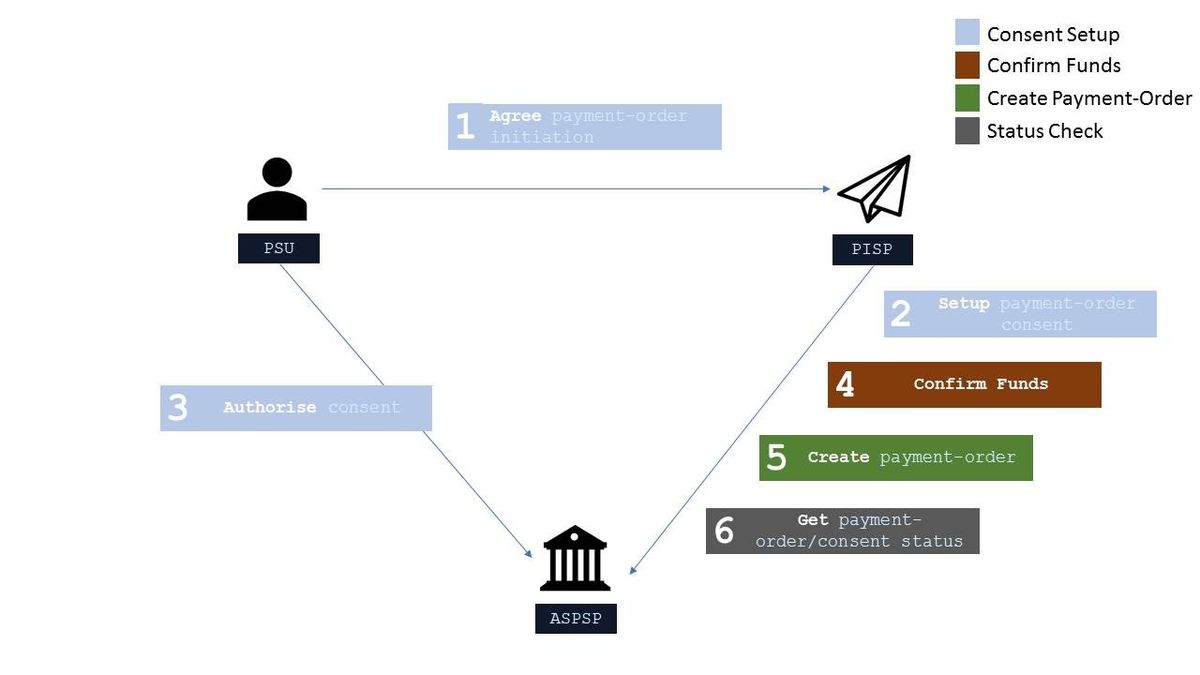
Steps
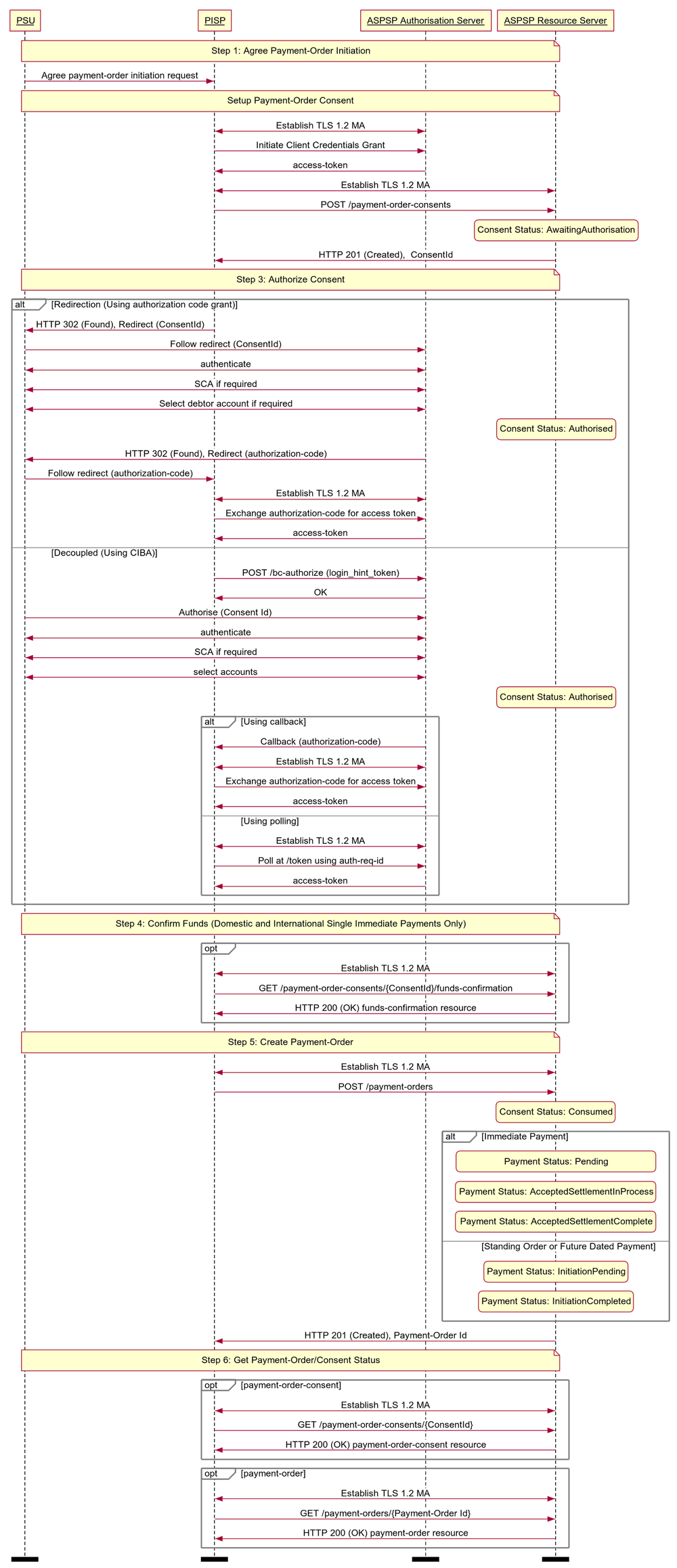
Step 1: Agree Payment-Order Initiation
- This flow begins with a PSU consenting to a payment being made. The consent is between the PSU and the PISP.
- The debtor account details can optionally be specified at this stage.
Step 2: Setup Payment-Order Consent
- The PISP connects to the ASPSP that services the PSU's payment account and creates a new payment-order consent resource. This informs the ASPSP that one of its PSUs intends to make a payment-order. The ASPSP responds with an identifier for the payment-order consent resource (the ConsentId, which is the intent identifier).
- This step is carried out by making a POST request to the payment-order consent resource.
Step 3: Authorise Consent
- The PISP requests the PSU to authorise the consent. The ASPSP may carry this out by using a redirection flow or a decoupled flow.
- In a redirection flow, the PISP redirects the PSU to the ASPSP.
- The redirect includes the ConsentId generated in the previous step.
- This allows the ASPSP to correlate the payment order consent that was setup.
- The ASPSP authenticates the PSU.
- The PSU selects the debtor account at this stage (if it has not been previously specified in Step 1).
- The ASPSP updates the state of the payment order consent resource internally to indicate that the consent has been authorised.
- Once the consent has been authorised, the PSU is redirected back to the PISP.
- In a decoupled flow, the ASPSP requests the PSU to authorise consent on an authentication device that is separate from the consumption device on which the PSU is interacting with the PISP.
- The decoupled flow is initiated by the PISP calling a back-channel authorisation request.
- The request contains a 'hint' that identifies the PSU paired with the consent to be authorised.
- The ASPSP authenticates the PSU
- The PSU selects the debtor account at this stage (if it has not been previously specified in Step 1)
- The ASPSP updates the state of the payment order consent resource internally to indicate that the consent has been authorised.
- Once the consent has been authorised, the ASPSP can make a callback to the PISP to provide an access token.
- In a redirection flow, the PISP redirects the PSU to the ASPSP.
Step 4: Confirm Funds (Domestic and International Single Immediate Payments Only)
- Once the PSU is authenticated and authorised the payment-order-consent, the PISP can check whether funds are available to make the payment.
- This is carried out by making a GET request, calling the funds-confirmation operator on the payment-order-consent resource.
Step 5: Create Payment-Order
- The PISP creates a payment-order resource to indicate that the payment created in the steps above should be submitted for processing.
- This is carried out by making a POST request to the appropriate payment-order resource.
- The ASPSP returns the identifier for the payment-order resource to the PISP.
Step 6: Get Payment-Order/Consent Status
- The PISP can check the status of the payment-order consent (with the ConsentId) or payment-order resource (with the payment-order resource identifier).
- This is carried out by making a GET request to the payment-order consent or payment-order resource.
Sequence Diagram
Payment Restrictions
The standard does not provide a uniform set of restrictions for payment-order types that can be supported through this API.
For example, but not limited to:
- The maximum InstructedAmount allowable.
- The domestic-standing-order Frequency patterns supported.
- The maximum future date on a scheduled-payment.
Each ASPSP must determine appropriate restrictions that they support based on their individual practices, standards and limitations. These restrictions should be documented on ASPSP developer portals.
An ASPSP must reject the payment-order consent if the ASPSP is unable to handle the request.
CutOffDateTime Behaviour
An ASPSP may return the specific CutOffDateTime when responding to a payment-order consent request.
An ASPSP must document the behaviour for a payment receipt before and after the CutOffDateTime for a payment-order has elapsed.
Two strategies for handling behaviour are:
- Reject the payment-order (and steps associated with the creation of payment-order) if received after the applicable CutOffDateTime
- Accept the payment-order (and steps associated with the creation of payment-order) if received after the applicable CutOffDateTime
Reject the Payment-Order
In this scenario, the behaviour of payment-order execution is explicit to the PISP and PSU.
- An ASPSP must reject the payment-order consent if the CutOffDateTime for a specific payment-order type has elapsed.
- An ASPSP must reject an authorization request when the underlying intent object is associated with a CutoffDateTime that has elapsed. The ASPSP must not issue an access token in such a situation. The ASPSP must set the status of the payment-order consent resource to “Rejected”.
- An ASPSP must reject the payment-order resource if the CutOffDateTime for a specific payment-order type, has been established and has elapsed.
- A PISP must ensure that the PSU consent authorisation is completed and the payment-order resource is created before the CutOffDateTime elapses.
For a payment-order consent or a payment-order resource that has been rejected due to the elapsed CutoffDateTime, the PISP may decide to create a corresponding schedule payment endpoint to create a new payment-order consent. E.g. if a PISP attempts to make a BACS payment after 16:00, it would be rejected. The PISP may use the /domestic-scheduled-payment-consents endpoint to create a consent for the same payment for the next working day.
Accept the Payment-Order
In this scenario, the behaviour of the payment-order execution is not explicit to the PISP and PSU, and the payment-order will be executed on the next available working day.
- An ASPSP must accept the payment-order consent if the CutOffDateTime for a specific payment-order type has elapsed.
- An ASPSP must accept an authorization request when the underlying intent object is associated with a CutoffDateTime that has elapsed.
- An ASPSP must accept the payment-order resource if the CutOffDateTime for a specific payment-order type, has been established and has elapsed.
- An ASPSP may update the payment-order consent or payment-order resource with the CutOffDateTime, ExpectedExecutionDateTime and ExpectedSettlementDateTime, to communicate expected execution behaviour if the CutOffDateTime has elapsed.
Release Management
This section overviews the release management and versioning strategy for the Payment Initiation API. It applies to all Payment Order Consent and Payment Order resources, specified in the Endpoints section.
Payment-Order Consent
POST
- A PISP must not create a payment-order consent ConsentId on a newer version and use it to create a payment-order resource in a previous version
- E.g., A ConsentId created in v3, must not be used to create a v1 PaymentSubmissionId
- A PISP must not create a payment-order consent ConsentId on a previous version and use it to create a payment-order resource in a newer version
- E.g., A PaymentId created in v1, must not be used to create a v3 DomesticPaymentId
GET
- A PISP must not access a payment-order ConsentId created in a newer version, via a previous version endpoint
- E.g., A ConsentId created in v3 accessed via a v1 PaymentId
- An ASPSP may choose to make ConsentIds accessible across versions
- E.g., for a PaymentId created in v1, an ASPSP may or may not make it available via v3, as this is a short-lived consent
Payment-Order Consent (Confirm Funds)
GET
- A PISP must not confirm funds using a payment-order-consent ConsentId created in a different version.
- E.g. A ConsentId created in v3, must not be used to confirm funds on a v1 endpoint.
Payment-Order Resource
POST
- A PISP must use a payment-order consent ConsentId within the same version to create the payment-order resource (in that version)
- E.g., A v3 payment-order consent can only be used to create a payment-order resource in v3.
- An ASPSP must not allow a PISP to use a ConsentId from a previous version to create a Payment Order in a newer version, and vice versa
GET
- A PISP must refer to the ASPSP's online Developer Portal for guidelines on accessibility of a payment-order resource in a newer version
- A PISP must not access the payment-order resource types introduced in a newer version, on an older version endpoint:
- E.g., an international-payment created in v3, that is accessed via the v1 payment-submissions endpoint.
- A PISP must not access the payment-order resource created in a newer version on an older version endpoint:
- E.g., for a domestic-payment resource created in v3, access via the v1 payment-submissions endpoint is not permitted.
- An ASPSP must document the behaviour on the accessibility of a payment-order resource in a newer version on the ASPSP's online Developer Portal.
- An ASPSP must allow access to the payment-order resource created in a previous version on a newer version endpoint (depending on an ASPSP's legal requirement for data retention):
- E.g., a payment-submission created in v1, must be accessible as a v3 domestic-payment, with sensible defaults for additional fields introduced in v3 (e.g., if an ASPSP must make payment resources available for 7 years).
- In the case where a payment-order type is the same, but the structure has changed in a newer version, sensible defaults may be used, with the ASPSP's Developer Portal clearly specifying the behaviour.
- E.g., a new field StatusUpdateDateTime was introduced in v3, an ASPSPs must populate this with the last status update time (as the StatusUpdateDateTime is a mandatory field).
Endpoints
This section looks at the list of available API endpoints to complete a Payment flow and optionality (definitions of mandatory, conditional or optional are defined in the Design Principles section in Read/Write Data API Specification). For detail on the request and response objects, please refer to the Data Model section of the specification.
The Mandatory/Conditional/Optional status of a resource's POST endpoint matches the GET operation. If a POST endpoint is implemented, the GET endpoint must also be implemented.
Endpoint design considerations:
- Having a separate resource for the payment-order consent and payment-order resource means we can extend the flows in the future.
- Separation in the payment-order consent and the payment-order resource also allows for cleaner separation in updating the status of resources for ASPSPs that chose to implement the functionally.
Security & Access Control
API Scopes
The access tokens required for accessing the Payment APIs must have at least the following scope:
payments
Grants Types
PISPs must use a client credentials grant to obtain a token to make POST requests to the payment-order consent endpoints. In the specification, this grant type is referred to as "Client Credentials".
PISPs must use an authorization code grant using a redirect or decoupled flow to obtain a token to make POST requests to the payment-order resource endpoints. This token may also be used to confirm funds on a payment-order consent resource. In the specification, this grant type is referred to as "Authorization Code".
PISPs must use a client credentials grant to obtain a token to make GET requests (excluding confirming funds).
Consent Authorisation
OAuth 2.0 scopes are coarse-grained and the set of available scopes are defined at the point of client registration. There is no standard method for specifying and enforcing fine-grained scopes e.g., a scope to enforce payments of a specified amount on a specified date.
A consent authorisation is used to define the fine-grained scope that is granted by the PSU to the PISP.
The PISP must begin a payment-order request by creating a payment-order consent resource through a POST operation. These resources indicate the consent that the PISP claims it has been given by the PSU. At this stage, the consent is not yet authorised as the ASPSP has not yet verified this claim with the PSU.
The ASPSP responds with a ConsentId. This is the intent-id that is used when initiating the authorization code grant (as described in the Trust Framework).
As part of the authorization code grant:
- The ASPSP authenticates the PSU.
- The ASPSP plays back the consent (registered by the PISP) back to the PSU to get consent authorisation. The PSU may accept or reject the consent in its entirety (but not selectively).
- If the consent did not indicate a debtor account the ASPSP presents the PSU with a list of accounts from which the PSU may select one.
Once these steps are complete, the consent is considered to have been authorised by the PSU.
Multiple Authorisation
In a multiple authorisation context, the same consent authorisation steps are followed for the first PSU to authorise or stage the payment-order consent.
In the payment-order consent:
- A PISP may request an AuthorisationType for the payment-order (i.e., Single or Any). If a value is not provided, an ASPSP will interpret the AuthorisationType as 'Any'.
- A PISP may request a CompletionDateTime for the payment-order authorisation to be complete. If a value is not provided, an ASPSP will interpret the CompletionDateTime as unbounded.
- An ASPSP must reject the payment-order consent if the AuthorisationType requested by the PISP does not match the DebtorAccount in the request.
- An ASPSP must set the status of the payment-order consent to Rejected, if the AuthorisationType requested by the PISP cannot be satisfied, after PSU Authentication:
- The ASPSP must respond back with an OAuth error response fields error specified as invalid_request and error_description containing an appropriate message.
- An ASPSP must restrict the selection of DebtorAccount (in the ASPSP online channel) to accounts that match the AuthorisationType requested by the PISP.
In the payment-order resource:
- An ASPSP must respond with the MultiAuthorisation object if the payment-order requires multiple authorisations. The MultiAuthorisation object indicates to the PISP that the payment-order requires multiple authorisations.
- The ASPSP must populate the MultiAuthorisation object with the Status of the multiple authorisaitons.
- The ASPSP may populate the MultiAuthorisation object with additional details of the multiple authorisation journey including:
- The number of required authorisations (total required at the start of the multi authorisation journey).
- The number of authorisations complete.
- The date and time of the last authorisation update.
- The date and time that the authorisation flow must be completed.
Once the final authorisation is received by the ASPSP, the ASPSP may notify the PISP that the payment-order resource has been fully Authorised using an Event Notification (as described in the Event Notification API Specification).
Error Condition
If the PSU does not complete a successful consent authorisation (e.g., if the PSU has not authenticated successfully), the authorization code grant ends with a redirection to the TPP with an error response as described in RFC 6749 Section 4.1.2.1. The PSU is redirected to the TPP with an error parameter indicating the error that occurred.
Consent Revocation
A PSU cannot revoke a payment-order consent once it has been authorized.
This is required to comply with Article 80 of PSD2.
Changes to Selected Account
For a payment-order consent, the selected debtor account cannot be changed once the consent has been authorized.
Consent Re-authentication
Payment consents are short-lived and cannot be re-authenticated by the PSU.
Risk Scoring Information
During the design workshops, ASPSPs articulated a need to perform risk scoring on the payments initiated via the Payment API.
Information for risk scoring and assessment will come via:
- FAPI HTTP headers. These are defined in Section 6.3 of the FAPI specification and in the Headers section above.
- Additional fields identified by the industry as business logic security concerns which will be passed in the Risk section of the payload in the JSON object.
These are the set of additional fields in the risk section of the payload for v1.0 which will be specified by the PISP:
- PaymentContextCode.
- MerchantCategoryCode.
- MerchantCustomerIdentification.
- DeliveryAddress.
The PaymentContextCode describes the payment context and can have these values:
- BillPayment.
- EcommerceGoods.
- EcommerceServices.
- Other.
- PartyToParty.
Payments for EcommerceGoods and EcommerceServices will be expected to have a MerchantCategoryCode and MerchantCustomerIdentification populated. Payments for EcommerceGoods will also have the DeliveryAddress populated.
These fields are documented further in the Data Payload section.
Swagger Specification
The Swagger Specification for Payment Initiation APIs can be downloaded from the following links:
Data Model
Reused Classes
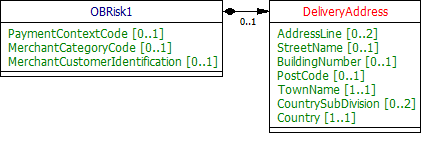
OBRisk1
This section describes the Risk1 class which is reused in the payment-order consent and payment-order resources.
UML Diagram
Data Dictionary
| Name | Occurrence | XPath | EnhancedDefinition | Class | Codes | Pattern |
|---|---|---|---|---|---|---|
| OBRisk1 | OBRisk1 | The Risk section is sent by the initiating party to the ASPSP. It is used to specify additional details for risk scoring for Payments. | OBRisk1 | |||
| PaymentContextCode | 0..1 | OBRisk1/PaymentContextCode | Specifies the payment context | OBExternalPaymentContext1Code | BillPayment EcommerceGoods EcommerceServices Other PartyToParty | |
| MerchantCategoryCode | 0..1 | OBRisk1/MerchantCategoryCode | Category code conform to ISO 18245, related to the type of services or goods the merchant provides for the transaction. | Min3Max4Text | ||
| MerchantCustomerIdentification | 0..1 | OBRisk1/MerchantCustomerIdentification | The unique customer identifier of the PSU with the merchant. | Max70Text | ||
| DeliveryAddress | 0..1 | OBRisk1/DeliveryAddress | Information that locates and identifies a specific address, as defined by postal services or in free format text. | PostalAddress18 | ||
| AddressLine | 0..2 | OBRisk1/DeliveryAddress/AddressLine | Information that locates and identifies a specific address, as defined by postal services, that is presented in free format text. | Max70Text | ||
| StreetName | 0..1 | OBRisk1/DeliveryAddress/StreetName | Name of a street or thoroughfare. | Max70Text | ||
| BuildingNumber | 0..1 | OBRisk1/DeliveryAddress/BuildingNumber | Number that identifies the position of a building on a street. | Max16Text | ||
| PostCode | 0..1 | OBRisk1/DeliveryAddress/PostCode | Identifier consisting of a group of letters and/or numbers that is added to a postal address to assist the sorting of mail. | Max16Text | ||
| TownName | 1..1 | OBRisk1/DeliveryAddress/TownName | Name of a built-up area, with defined boundaries, and a local government. | Max35Text | ||
| CountrySubDivision | 0..2 | OBRisk1/DeliveryAddress/CountrySubDivision | Identifies a subdivision of a country, for instance state, region, county. | Max35Text | ||
| Country | 1..1 | OBRisk1/DeliveryAddress/Country | Nation with its own government, occupying a particular territory. | CountryCode | ^[A-Z]{2,2}$ |
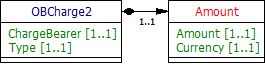
OBCharge2
This section describes the OBCharge2 class - which is reused in the response payloads in the payment-order consent and payment-order resources.
UML Diagram
Data Dictionary
Name | Occurrence | XPath | EnhancedDefinition | Class | Codes | Pattern |
|---|---|---|---|---|---|---|
| OBCharge2 | OBCharge2 | Set of elements used to provide details of a charge for the payment initiation. | OBCharge2 | |||
| ChargeBearer | 1..1 | OBCharge2/ChargeBearer | Specifies which party/parties will bear the charges associated with the processing of the payment transaction. | OBChargeBearerType1Code | BorneByCreditor BorneByDebtor FollowingServiceLevel Shared | |
| Type | 1..1 | OBCharge2/Type | Charge type, in a coded form. | OBExternalPaymentChargeType1Code | ||
| Amount | 1..1 | OBCharge2/Amount | Amount of money associated with the charge type. | OBActiveOrHistoricCurrencyAndAmount | ||
| Amount | 1..1 | OBCharge2/Amount/Amount | A number of monetary units specified in an active currency where the unit of currency is explicit and compliant with ISO 4217. | OBActiveCurrencyAndAmount_SimpleType | ^\d{1,13}\.\d{1,5}$ | |
| Currency | 1..1 | OBCharge2/Amount/Currency | A code allocated to a currency by a Maintenance Agency under an international identification scheme, as described in the latest edition of the international standard ISO 4217 "Codes for the representation of currencies and funds". | ActiveOrHistoricCurrencyCode | ^[A-Z]{3,3}$ |
OBAuthorisation1
This section describes the OBAuthorisation1 class which is used in the payment-order consent request and payment-order consent response payloads.
UML Diagram
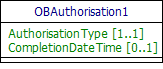
Data Dictionary
| Name | Occurrence | XPath | EnhancedDefinition | Class | Codes | Pattern |
|---|---|---|---|---|---|---|
| OBAuthorisation1 | OBAuthorisation1 | The authorisation type request from the TPP. | OBAuthorisation1 | |||
| AuthorisationType | 1..1 | OBAuthorisation1/AuthorisationType | Type of authorisation flow requested. | OBExternalAuthorisation1Code | Any Single | |
| CompletionDateTime | 0..1 | OBAuthorisation1/CompletionDateTime | Date and time at which the requested authorisation flow must be completed. | ISODateTime |
OBMultiAuthorisation1
This section describes the OBMultiAuthorisation1 class which used in the response payloads of payment-order resources.
UML Diagram
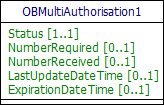
Data Dictionary
| Name | Occurrence | XPath | EnhancedDefinition | Class | Codes | Pattern |
|---|---|---|---|---|---|---|
| OBMultiAuthorisation1 | OBMultiAuthorisation1 | The multiple authorisation flow response from the ASPSP. | OBMultiAuthorisation1 | |||
| Status | 1..1 | OBMultiAuthorisation1/Status | Specifies the status of the authorisation flow in code form. | OBExternalStatus2Code | Authorised AwaitingFurtherAuthorisation Rejected | |
| NumberRequired | 0..1 | OBMultiAuthorisation1/NumberRequired | Number of authorisations required for payment order (total required at the start of the multi authorisation journey). | Number | ||
| NumberReceived | 0..1 | OBMultiAuthorisation1/NumberReceived | Number of authorisations received. | Number | ||
| LastUpdateDateTime | 0..1 | OBMultiAuthorisation1/LastUpdateDateTime | Last date and time at the authorisation flow was updated. | ISODateTime | ||
| ExpirationDateTime | 0..1 | OBMultiAuthorisation1/ExpirationDateTime | Date and time at which the requested authorisation flow must be completed. | ISODateTime |
Identifier Fields
This section describes the identifiers used through the Payment API flows, the direction of flow through the system, and how they are used.
The standard definitions for the elements in the API payloads are described in the Data Payload section. However, this table gives further detail on the business meaning, and how they are used.
| Generated | Identifier | Business Description |
|---|---|---|
Merchant/PISP Sent in API Payload | EndToEndIdentification | The EndToEndIdentification reference is a reference that can be populated by the debtor (or merchant in the ecommerce space). This reference is important to the debtor (could be an internal reference Id against the transaction), it Is NOT the reference information that will be primarily populated on the statement of the creditor (beneficiary). |
Merchant/PISP Sent in API Payload | InstructionIdentification | The PISP generates the InstructionIdentification which is a unique transaction Id and passes it to the ASPSP (this is mandatory), but this does not have to go any further in the payment flow. The flow of this identifier needs to align with payment scheme rules. The expectation is that this is unique indefinitely across all time periods. The PISP can ensure this is indefinitely unique by including a date or date time element to the field, or by inserting a unique Id. |
Merchant/PISP Sent in API Payload | RemittanceInformation | The RemittanceInformation is the reference information that the creditor (or beneficiary) will need to reconcile (e.g. Invoice 123). |
ASPSP / API System | ConsentId | A unique identification as assigned by the ASPSP to uniquely identify the payment-order consent resource. |
| ASPSP / API System | Payment Order Id | Anique identification as assigned by the ASPSP to uniquely identify the payment-order resource. DomesticPaymentId DomesticScheduledPaymentId DomesticStandingOrderId InternationalPaymentId InternationalScheduledPaymentId |
ASPSP / Payment Scheme | Scheme Payment ID | This is generated by the ASPSP to uniquely identify a payment through a processing scheme. In the case of FPS, this is the FPID. |
The tables below identify the actor that initially creates each of the message identifiers and their transmission and visibility to other actors.
These flows are indicative and will be dependent on what payment schemes or agencies are able to support.
Key:
O indicates the actor that creates the identifier.
=> downstream direction of flow
<= upstream direction of flow
Merchant Flow
| Identifier | PSU | Merchant | PISP | ASPSP Originating Bank | Payment Scheme | Beneficiary |
|---|---|---|---|---|---|---|
| EndToEndIdentification | O | => | => | => | => | |
| RemittanceInformation | O | => | => | => | => | |
| InstructionIdentification | O | => | ||||
| ConsentId | <= | O | ||||
| Payment Order Id | <= | O | ||||
Scheme Payment ID (e.g., FPID) | O | => | => |
Party to Party Flow
| Identifier | PSU | Merchant | PISP | ASPSP Originating Bank | Payment Scheme | Beneficiary |
|---|---|---|---|---|---|---|
| EndToEndIdentification | O | => | => | => | ||
| RemittanceInformation | O | => | => | => | => | |
| InstructionIdentification | O | => | ||||
| ConsentId | <= | O | ||||
| Payment Order Id | <= | O | ||||
Scheme Payment ID (e.g., FPID) | O | => | => |
Payment Order Types
Each of the payment-order types are documented in sub-pages of this specification. Each payment-order type is documented with:
- Endpoints
- The API endpoints available for the resource.
- Data Model
- Resource definition.
- UML diagram.
- Permissions as they relate to accessing the resource.
- Data dictionary - which defines fields, re-usable classes, mandatory (1..1) or conditional (0..1) as defined in the Design Principles section, and enumerations.
- Usage Examples.
Enumerations
Static Enumerations
This section gives the definitions for enumerations used in the Payment APIs.
| Code Class | Name | Definition |
|---|---|---|
| OBExternalPaymentContext1Code | BillPayment | The context of the payment initiation is a bill payment. |
| OBExternalPaymentContext1Code | EcommerceGoods | The context of the payment initiation is for goods via an ecommerce channel. |
| OBExternalPaymentContext1Code | EcommerceServices | The context of the payment initiation is for services via an ecommerce channel. |
| OBExternalPaymentContext1Code | PartyToParty | The context of the payment initiation is a party to party payment. |
| OBExternalPaymentContext1Code | Other | The context of the payment initiation is of an other type. |
| OBTransactionIndividualStatus1Code | AcceptedSettlementCompleted | Settlement on the debtor's account has been completed. PISPs must not use this status as confirmation that settlement is complete on the creditor's account. |
| OBTransactionIndividualStatus1Code | AcceptedSettlementInProcess | All preceding checks such as technical validation and customer profile were successful and therefore the payment initiation has been accepted for execution. |
| OBTransactionIndividualStatus1Code | Pending | Payment initiation or individual transaction included in the payment initiation is pending. Further checks and status update will be performed. |
| OBTransactionIndividualStatus1Code | Rejected | Payment initiation or individual transaction included in the payment initiation has been rejected. |
| OBExternalConsentStatus1Code | AwaitingAuthorisation | The consent resource is awaiting PSU authorisation. |
| OBExternalConsentStatus1Code | Rejected | The consent resource has been rejected. |
| OBExternalConsentStatus1Code | Authorised | The consent resource has been successfully authorised. |
| OBExternalConsentStatus1Code | Consumed | The consented action has been successfully completed. This does not reflect the status of the consented action. |
| OBChargeBearerType1Code | BorneByCreditor | All transaction charges are to be borne by the creditor. |
| OBChargeBearerType1Code | BorneByDebtor | All transaction charges are to be borne by the debtor. |
| OBChargeBearerType1Code | FollowingServiceLevel | Charges are to be applied following the rules agreed in the service level and/or scheme. |
| OBChargeBearerType1Code | Shared | In a credit transfer context, means that transaction charges on the sender side are to be borne by the debtor, transaction charges on the receiver side are to be borne by the creditor. In a direct debit context, means that transaction charges on the sender side are to be borne by the creditor, transaction charges on the receiver side are to be borne by the debtor. |
| OBExternalAuthorisation1Code | Any | Any authorisation type is requested. |
| OBExternalAuthorisation1Code | Multiple | Multiple authorisation type is requested. |
| OBExternalAuthorisation1Code | Single | Single authorisation type is requested. |
| OBExternalStatus1Code | InitiationCompleted | The payment-order initiation has been completed. |
| OBExternalStatus1Code | InitiationFailed | The payment-order initiation has failed. |
| OBExternalStatus1Code | InitiationPending | The payment-order initiation is pending. |
| OBExternalStatus2Code | Authorised | The multiple authorisation flow has been fully authorised. |
| OBExternalStatus2Code | AwaitingFurtherAuthorisation | The multiple authorisation flow is awaiting further authorisation. |
| OBExternalStatus2Code | Rejected | The multiple authorisation flow has been rejected. |
| OBExchangeRateType2Code | Actual | Exchange rate is the actual rate. |
| OBExchangeRateType2Code | Agreed | Exchange rate is the agreed rate between the parties. |
| OBExchangeRateType2Code | Indicative | Exchange rate is the indicative rate. |
| OBPriority2Code | Normal | Priority is normal. |
| OBPriority2Code | Urgent | Priority is urgent. |
| OBAddressTypeCode | Business | Address is the business address. |
| OBAddressTypeCode | Correspondence | Address is the address where correspondence is sent. |
| OBAddressTypeCode | DeliveryTo | Address is the address to which delivery is to take place. |
| OBAddressTypeCode | MailTo | Address is the address to which mail is sent. |
| OBAddressTypeCode | POBox | Address is a postal office (PO) box. |
| OBAddressTypeCode | Postal | Address is the complete postal address. |
| OBAddressTypeCode | Residential | Address is the home address. |
| OBAddressTypeCode | Statement | Address is the address where statements are sent. |
ISO Enumerations
These following ISO Enumerations are used in the Payment APIs.
| ISO Data Type | Fields | ISO Enumeration Values URL |
|---|---|---|
| Min3Max4Text | MerchantCategoryCode | https://www.iso.org/standard/33365.html |
| ActiveOrHistoricCurrencyCode | Currency | https://www.iso20022.org/external_code_list.page |
| CountryCode | Country | https://en.wikipedia.org/wiki/ISO_3166-1_alpha-2#Officially_assigned_code_elements |
Namespaced Enumerations
The enumerated values specified by Open Banking are documented in Swagger specification and Namespaced Enumerations page.
Alternative and Error Flows
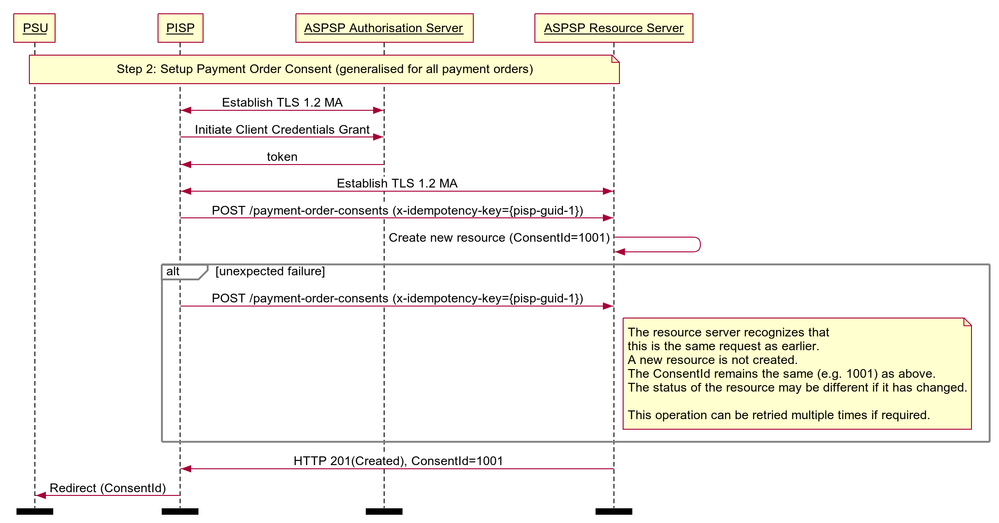
Idempotent Payment Order Consent
Note: this flow has been generalised for all payment-order types.
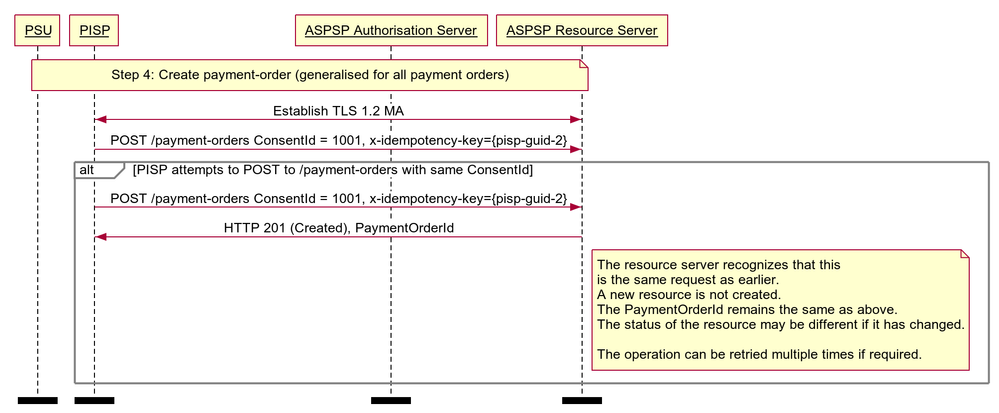
Idempotent Payment Order
Note: this flow has been generalised for all payment-order types.
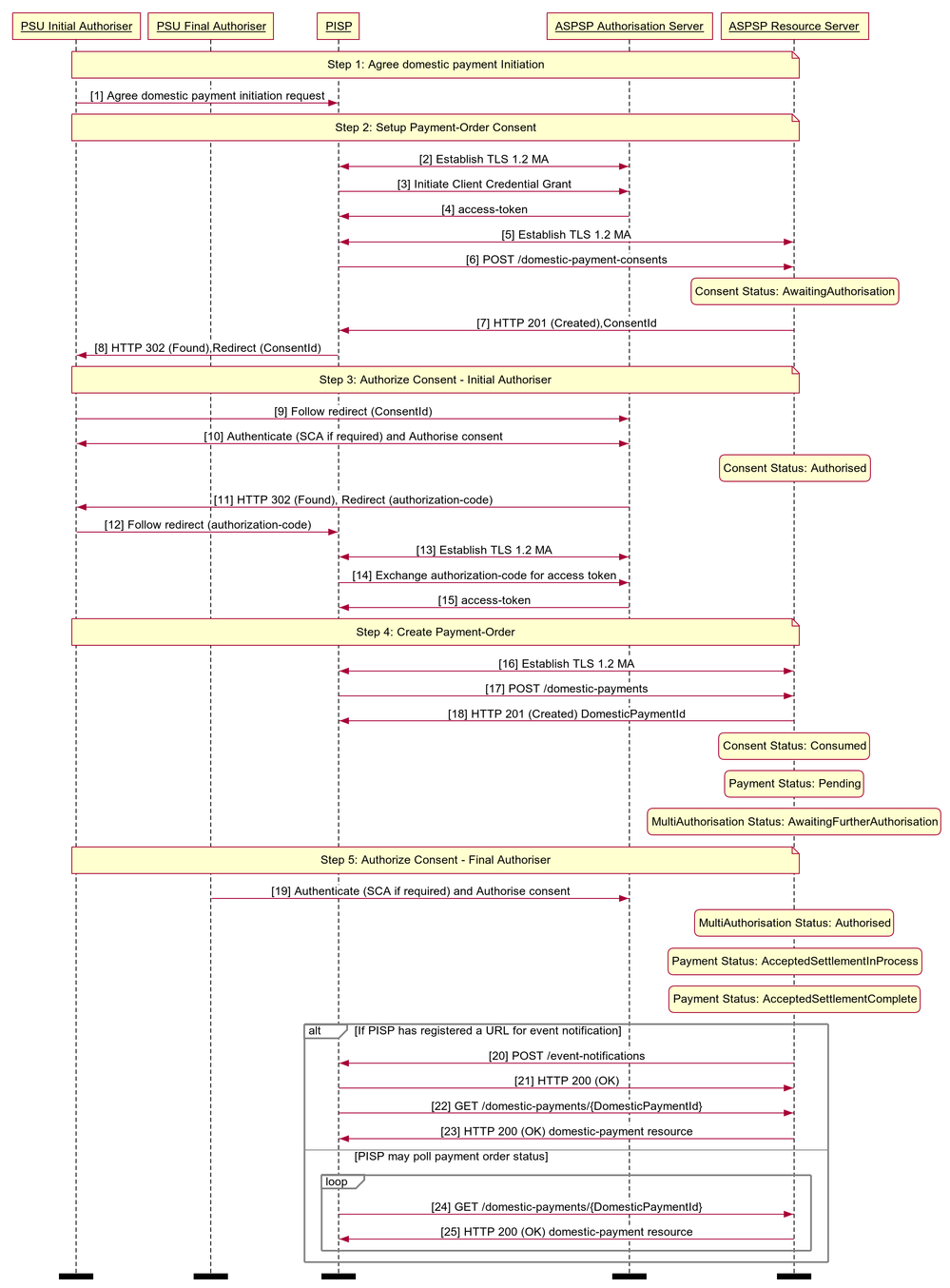
Multi-Auth Payment Order Consent
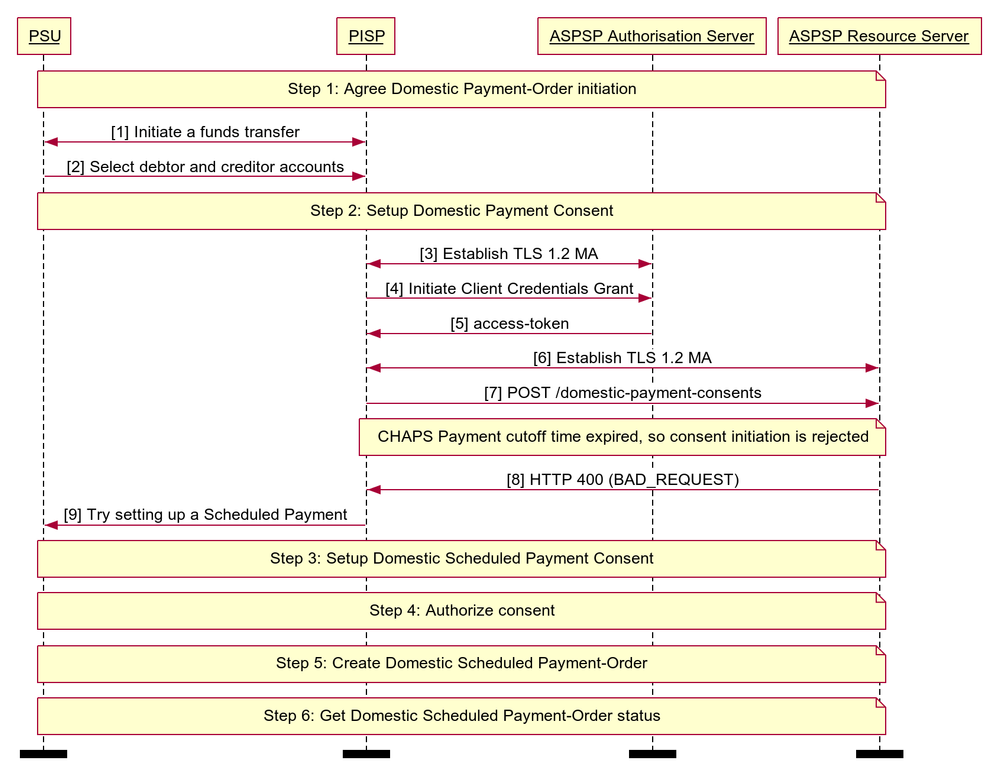
Reject the Payment Order Consent Creation After CutOffDateTime
This example illustrates a scenario where an ASPSP choses to Reject the Payment-Order consent/resource request, after the CutoffTime. We have a CHAPS payment-order consent created after the CutOffDateTime, and ASPSP rejects the Consent, and the PISP chooses to place a Scheduled Payment-Order consent.
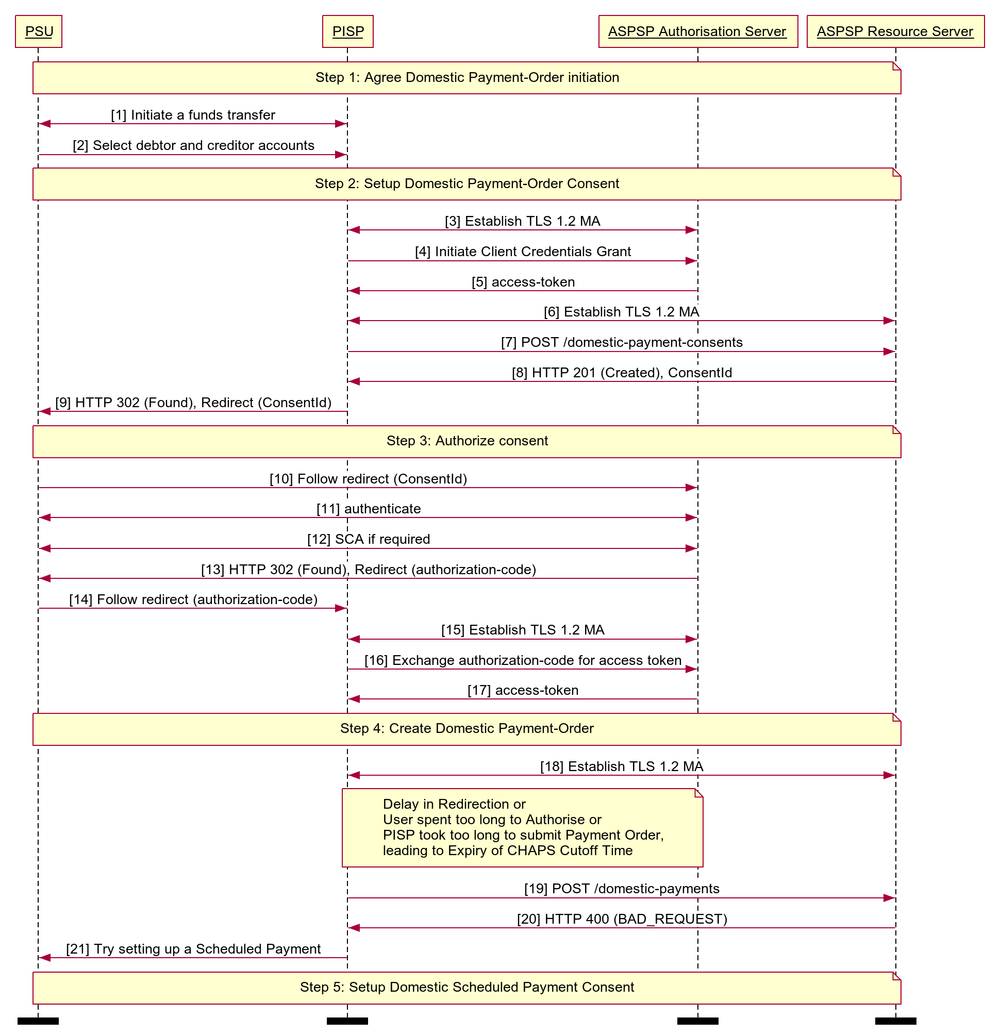
Reject the Payment Order Creation After CutOffDateTime
This example illustrates a scenario where an ASPSP choses to Reject the Payment-Order consent/resource request, after the CutoffTime. We have a CHAPS payment-order Consent created and the Authorisation completed before the CutOffDateTime, but the Payment-Order submission happened after the CutOffDateTime, so the ASPSP has rejected it.
© Open Banking Limited 2019 | https://www.openbanking.org.uk/open-licence | https://www.openbanking.org.uk