International Standing Orders v3.1.2
- Freddi Gyara (Unlicensed)
- Anonymous
Version Control
| Version | Date | Author | Comments |
|---|---|---|---|
| 3.1 | OB R/W API Team | This is the baseline version. | |
| 4.0-draft1 | OB R/W API Team | No changes. | |
| 4.0-draft3 | OB R/W API Team | v4.0-draft3 changes:
| |
| 4.0-draft6 | OB R/W API Team | v4.0-draft6 changes:
| |
| 4.0-draft7 | OB R/W API Team | v4.0-draft7 changes:
| |
| 3.1.2-RC1 | OB R/W API Team | v3.1.2-RC1 changes:
|
Endpoints
| Resource | HTTP Operation | Endpoint | Mandatory ? | Scope | Grant Type | Message Signing | Idempotency Key | Request Object | Response Object |
|---|---|---|---|---|---|---|---|---|---|
| international-standing-order-consents | POST | POST /international-standing-order-consents | Conditional | payments | Client Credentials | Signed Request Signed Response | Yes | OBWriteInternationalStandingOrderConsent4 | OBWriteInternationalStandingOrderConsentResponse4 |
| international-standing-order-consents | GET | GET /international-standing-order-consents/{ConsentId} | Mandatory (if resource POST implemented) | payments | Client Credentials | Signed Response | No | NA | OBWriteInternationalStandingOrderConsentResponse4 |
| international-standing-orders | POST | POST /international-standing-orders | Conditional | payments | Authorization Code | Signed Request Signed Response | Yes | OBWriteInternationalStandingOrder3 | OBWriteInternationalStandingOrderResponse4 |
| international-standing-orders | GET | GET /international-standing-orders/{InternationalStandingOrderPaymentId} | Mandatory (if resource POST implemented) | payments | Client Credentials | Signed Response | No | NA | OBWriteInternationalStandingOrderResponse4 |
| payment-details | GET | GET /international-standing-orders/{InternationalStandingOrderPaymentId}/payment-details | Optional | payments | Client Credentials | Signed Response | No | NA | OBWritePaymentDetailsResponse1 |
POST /international-standing-order-consents
POST /international-standing-order-consents
The API endpoint allows the PISP to ask an ASPSP to create a new international-standing-order-consent resource.
- The POST action indicates to the ASPSP that an international standing order consent has been staged. At this point, the PSU may not have been identified by the ASPSP, and the request payload may not contain any information of the account that should be debited.
- The endpoint allows the PISP to send a copy of the consent (between PSU and PISP) to the ASPSP for the PSU to authorise.
- The ASPSP creates the international-standing-order-consent resource and responds with a unique ConsentId to refer to the resource.
Status
The default Status is "AwaitingAuthorisation" immediately after the international-standing-order-consent has been created.
| Status |
|---|
| AwaitingAuthorisation |
GET /international-standing-order-consents/{ConsentId}
GET /international-standing-order-consents/{ConsentId}
A PISP can optionally retrieve a payment consent resource that they have created to check its status.
Status
Once the PSU authorises the payment-consent resource - the Status of the payment-consent resource will be updated with "Authorised".
If the PSU rejects the consent or the international-standing-order-consent has failed some other ASPSP validation, the Status will be set to "Rejected".
Once an international-standing-orders has been successfully created using the international-standing-order-consent, the Status of the international-standing-order-consent will be set to "Consumed".
The available Status codes for the international-standing-order-consent resource are:
| Status |
|---|
| AwaitingAuthorisation |
| Rejected |
| Authorised |
| Consumed |
POST /international-standing-orders
POST /international-standing-orders
Once the international-standing-order-consent has been authorised by the PSU, the PISP can proceed to submit the international-standing-orders for processing:
- This is done by making a POST request to the international-standing-orders endpoint.
- This request is an instruction to the ASPSP to begin the international standing order journey. The PISP must submit the international standing order immediately, however, there are some scenarios where the ASPSP may not warehouse the international standing order immediately (e.g. busy periods at the ASPSP).
- The PISP must ensure that the Initiation and Risk sections of the international-standing-orders match the corresponding Initiation and Risk sections of the international-standing-order-consent resource. If the two do not match, the ASPSP must not process the request and must respond with a 400 (Bad Request).
- Any operations on the international-standing-orders resource will not result in a Status change for the international-standing-orders resource.
Status
An international-standing-orders can only be created if its corresponding international-standing-order-consent resource has the status of "Authorised".
The international-standing-orders resource that is created successfully must have one of the following Status codes:
| Status |
|---|
| InitiationPending |
| InitiationFailed |
| InitiationCompleted |
GET /international-standing-orders/{InternationalStandingOrderPaymentId}
GET /international-standing-orders/{InternationalStandingOrderPaymentId}
A PISP can retrieve the international-standing-orders to check its status.
Status
The international-standing-orders resource must have one of the following Status codes:
| Status |
|---|
| InitiationPending |
| InitiationFailed |
| InitiationCompleted |
| Cancelled |
GET /international-standing-orders/{InternationalStandingOrderPaymentId}/payment-details
GET /international-standing-orders/{InternationalStandingOrderPaymentId}/payment-details
A PISP can retrieve the Details of the underlying payment transaction via this endpoint. This resource allows ASPSPs to return richer list of Payment Statuses, and if available payment scheme related statuses.
Status
The international-standing-orders - payment-details must have one of the following PaymentStatusCode code-set enumerations:
Status |
|---|
| Accepted |
| AcceptedCancellationRequest |
| AcceptedTechnicalValidation |
| AcceptedCustomerProfile |
| AcceptedFundsChecked |
| AcceptedWithChange |
| Pending |
| Rejected |
| AcceptedSettlementInProcess |
| AcceptedSettlementCompleted |
| AcceptedWithoutPosting |
| AcceptedCreditSettlementCompleted |
| Cancelled |
| NoCancellationProcess |
| PartiallyAcceptedCancellationRequest |
| PartiallyAcceptedTechnicalCorrect |
| PaymentCancelled |
| PendingCancellationRequest |
| Received |
| RejectedCancellationRequest |
State Model
Payment Order Consent
The state model for the international-standing-order-consent resource follows the generic consent state model. However, does not use the "Revoked" status, as the consent for an international-standing-order is not a long-lived consent.
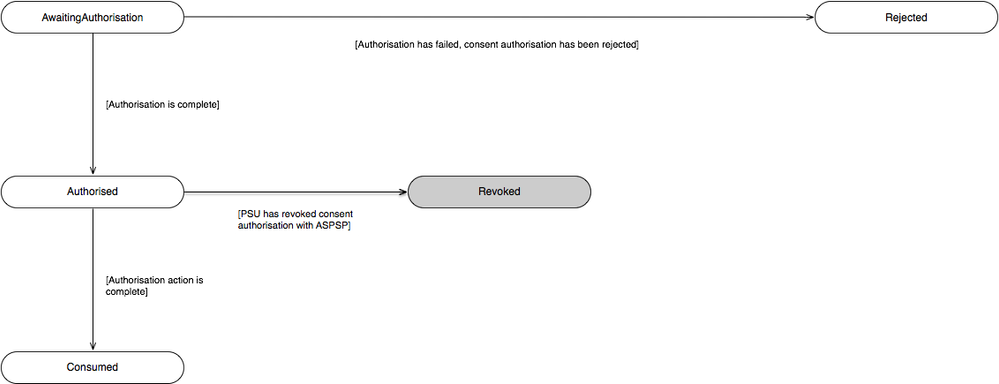
The definitions for the Status:
| Status | Status Description | |
|---|---|---|
| 1 | AwaitingAuthorisation | The consent resource is awaiting PSU authorisation. |
| 2 | Rejected | The consent resource has been rejected. |
| 3 | Authorised | The consent resource has been successfully authorised. |
| 4 | Consumed | The consented action has been successfully completed. This does not reflect the status of the consented action. |
Payment Order
The state model for the international-standing-orders resource describes the initiation status only. I.e., not the subsequent execution of the international-standing-orders.
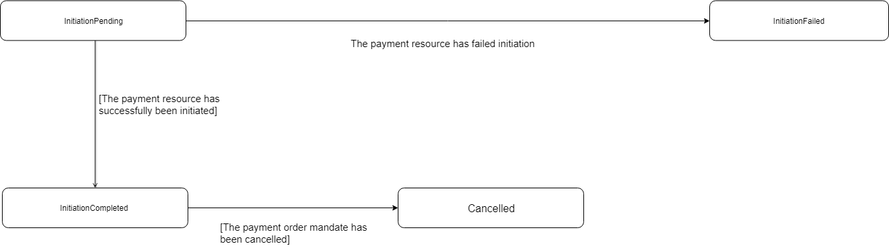
The definitions for the Status:
| Status | Payment Status Description | |
|---|---|---|
| 1 | InitiationPending | The initiation of the payment order is pending. |
| 2 | InitiationFailed | The initiation of the payment order has failed. |
| 3 | InitiationCompleted | The initiation of the payment order is complete. |
| 4 | Cancelled | Payment initiation has been successfully cancelled after having received a request for cancellation. |
Multiple Authorisation
If the payment-order requires multiple authorisations, the Status of the multiple authorisations will be updated in the MultiAuthorisation object.
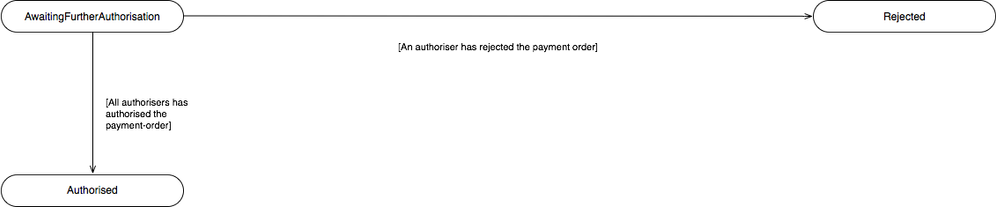
The definitions for the Status:
| Status | Status Description | |
|---|---|---|
| 1 | AwaitingFurtherAuthorisation | The payment-order resource is awaiting further authorisation. |
| 2 | Rejected | The payment-order resource has been rejected by an authoriser. |
| 3 | Authorised | The payment-order resource has been successfully authorised by all required authorisers. |
Data Model
The data dictionary section gives the detail on the payload content for the International Standing Order API flows.
Reused Classes
OBInternationalStandingOrder3
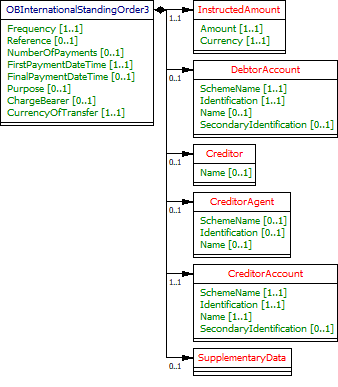
This section describes the OBInternationalStandingOrder3 class which is reused as the Initiation object in the international-standing-order-consent and international-standing-orders resources.
UML Diagram
Notes
For the OBInternationalStandingOrder3 Initiation object:
- All elements in the Initiation payload that are specified by the PISP must not be changed via the ASPSP - as this is part of formal consent from the PSU.
If the ASPSP is able to establish a problem with payload or any contextual error during the API call, the ASPSP must reject the international-standing-order-consent request immediately.
If the ASPSP establishes a problem with the international-standing-order-consent after the API call, the ASPSP must set the Status of the international-standing-order-consent resource to Rejected.
- The DebtorAccount is optional as the PISP may not know the account identification details for the PSU.
- If the DebtorAccount is specified by the PISP and is invalid for the PSU, then the international-standing-order-consent will be set to Rejected after PSU authentication.
- The CreditorAgent must at least have either of the pairs provided: SchemeName and Identification, or Name and PostalAddress.
- Account Identification field usage:
- SchemeName is a free-text field which will be populated with identification schemes an ASPSP accepts.
- Identification is a field which is populated with the Identification of the account, using the valid identification scheme provided.
- Valid UK Account Identification SchemeName values include, but are not restricted to:
- "UK.OBIE.SortCodeAccountNumber" - The Identification field must be populated with the 6 digit Sort Code and 8 digit Account Number (a 14 digit field).
- "UK.OBIE.IBAN" - The Identification field must be populated with the full IBAN.
- "UK.OBIE.PAN" - The Identification field must be populated with the full PAN. A PAN may be an instrument (e.g., a debit card) linked to a payment account, and may not be the only PAN linked to the payment account.
- The InstructedAmount object must be populated with the desired Amount and Currency of transfer, regardless of the currency of the DebtorAccount. I.e., a PSU may wish to transfer 100EUR from a GBP DebtorAccount (InstructedAmount will be 100EUR), or 100GBP in EUR (the InstructedAmount will be 100GBP).
- The CurrencyOfTransfer must be used to specify the currency the funds will be transferred. I.e., a PSU may wish to transfer 100USD from a GBP DebtorAccount to a Rupee INR CreditorAccount in India.
- The ChargeBearer field is used by the PISP to indicate the bearer of charges. An ASPSP must Reject the Initiation request if the requested charge allocation cannot be fulfilled.
- Permission field is restricted to "Create", however, may be extended to "Update" and "Delete" in a future iteration of the specification.
Data Dictionary
| Name | Occurrence | XPath | EnhancedDefinition | Class | Codes | Pattern |
|---|---|---|---|---|---|---|
OBInternationalStandingOrder3 | OBInternationalStandingOrder3 | The Initiation payload is sent by the initiating party to the ASPSP. It is used to request movement of funds from the debtor account to a creditor for an international standing order. | OBInternationalStandingOrder3 | |||
Frequency | 1..1 | OBInternationalStandingOrder3/Frequency | Individual Definitions: EvryDay - Every day EvryWorkgDay - Every working day IntrvlDay - An interval specified in number of calendar days (02 to 31) IntrvlWkDay - An interval specified in weeks (01 to 09), and the day within the week (01 to 07) WkInMnthDay - A monthly interval, specifying the week of the month (01 to 05) and day within the week (01 to 07) IntrvlMnthDay - An interval specified in months (between 01 to 06, 12, 24), specifying the day within the month (-05 to -01, 01 to 31) QtrDay - Quarterly (either ENGLISH, SCOTTISH, or RECEIVED). ENGLISH = Paid on the 25th March, 24th June, 29th September and 25th December. SCOTTISH = Paid on the 2nd February, 15th May, 1st August and 11th November. RECEIVED = Paid on the 20th March, 19th June, 24th September and 20th December. Individual Patterns: EvryDay (ScheduleCode) EvryWorkgDay (ScheduleCode) IntrvlDay:NoOfDay (ScheduleCode + NoOfDay) IntrvlWkDay:IntervalInWeeks:DayInWeek (ScheduleCode + IntervalInWeeks + DayInWeek) WkInMnthDay:WeekInMonth:DayInWeek (ScheduleCode + WeekInMonth + DayInWeek) IntrvlMnthDay:IntervalInMonths:DayInMonth (ScheduleCode + IntervalInMonths + DayInMonth) QtrDay: + either (ENGLISH, SCOTTISH or RECEIVED) ScheduleCode + QuarterDay The regular expression for this element combines five smaller versions for each permitted pattern. To aid legibility - the components are presented individually here: EvryDay EvryWorkgDay IntrvlDay:((0[2-9])|([1-2][0-9])|3[0-1]) IntrvlWkDay:0[1-9]:0[1-7] WkInMnthDay:0[1-5]:0[1-7] IntrvlMnthDay:(0[1-6]|12|24):(-0[1-5]|0[1-9]|[12][0-9]|3[01]) QtrDay:(ENGLISH|SCOTTISH|RECEIVED) Full Regular Expression: ^(EvryDay)$|^(EvryWorkgDay)$|^(IntrvlDay:((0[2-9])|([1-2][0-9])|3[0-1]))$|^(IntrvlWkDay:0[1-9]:0[1-7])$|^(WkInMnthDay:0[1-5]:0[1-7])$|^(IntrvlMnthDay:(0[1-6]|12|24):(-0[1-5]|0[1-9]|[12][0-9]|3[01]))$|^(QtrDay:(ENGLISH|SCOTTISH|RECEIVED))$ | Max35Text | ^(EvryDay)$|^(EvryWorkgDay)$|^(IntrvlWkDay:0[1-9]:0[1-7])$|^(WkInMnthDay:0[1-5]:0[1-7])$|^(IntrvlMnthDay:(0[1-6]|12|24):(-0[1-5]|0[1-9]|[12][0-9]|3[01]))$|^(QtrDay:(ENGLISH|SCOTTISH|RECEIVED))$ | |
Reference | 0..1 | OBInternationalStandingOrder3/Reference | Unique reference, as assigned by the creditor, to unambiguously refer to the payment transaction. Usage: If available, the initiating party should provide this reference in the structured remittance information, to enable reconciliation by the creditor upon receipt of the amount of money. If the business context requires the use of a creditor reference or a payment remit identification, and only one identifier can be passed through the end-to-end chain, the creditor's reference or payment remittance identification should be quoted in the end-to-end transaction identification. | Max35Text | ||
NumberOfPayments | 0..1 | OBInternationalStandingOrder3/NumberOfPayments | Number of the payments that will be made in completing this frequency sequence including any executed since the sequence start date. | Max35Text | ||
FirstPaymentDateTime | 1..1 | OBInternationalStandingOrder3/FirstPaymentDateTime | The date on which the first payment for a Standing Order schedule will be made. | ISODateTime | ||
FinalPaymentDateTime | 0..1 | OBInternationalStandingOrder3/FinalPaymentDateTime | The date on which the final payment for a Standing Order schedule will be made. | ISODateTime | ||
Purpose | 0..1 | OBInternationalStandingOrder3/Purpose | Specifies the external purpose code in the format of character string with a maximum length of 4 characters. The list of valid codes is an external code list published separately. External code sets can be downloaded from www.iso20022.org. | OBExternalPurpose1Code1 | ||
ChargeBearer | 0..1 | OBInternationalStandingOrder3/ChargeBearer | Specifies which party/parties will bear the charges associated with the processing of the payment transaction. | OBChargeBearerType1Code | BorneByCreditor BorneByDebtor FollowingServiceLevel Shared | |
CurrencyOfTransfer | 1..1 | OBInternationalStandingOrder3/CurrencyOfTransfer | Specifies the currency of the to be transferred amount, which is different from the currency of the debtor's account. | ActiveOrHistoricCurrencyCode | ^[A-Z]{3,3}$ | |
InstructedAmount | 1..1 | OBInternationalStandingOrder3/InstructedAmount | Amount of money to be moved between the debtor and creditor, before deduction of charges, expressed in the currency as ordered by the initiating party. Usage: This amount has to be transported unchanged through the transaction chain. | OBActiveOrHistoricCurrencyAndAmount | ||
Amount | 1..1 | OBInternationalStandingOrder3/InstructedAmount/Amount | A number of monetary units specified in an active currency where the unit of currency is explicit and compliant with ISO 4217. | OBActiveCurrencyAndAmount_SimpleType | ^\d{1,13}\.\d{1,5}$ | |
Currency | 1..1 | OBInternationalStandingOrder3/InstructedAmount/Currency | A code allocated to a currency by a Maintenance Agency under an international identification scheme, as described in the latest edition of the international standard ISO 4217 "Codes for the representation of currencies and funds". | ActiveOrHistoricCurrencyCode | ^[A-Z]{3,3}$ | |
DebtorAccount | 0..1 | OBInternationalStandingOrder3/DebtorAccount | Provides the details to identify the debtor account. | OBCashAccountDebtor4 | ||
SchemeName | 1..1 | OBInternationalStandingOrder3/DebtorAccount/SchemeName | Name of the identification scheme, in a coded form as published in an external list. | OBExternalAccountIdentification4Code | ||
Identification | 1..1 | OBInternationalStandingOrder3/DebtorAccount/Identification | Identification assigned by an institution to identify an account. This identification is known by the account owner. | Max256Text | ||
Name | 0..1 | OBInternationalStandingOrder3/DebtorAccount/Name | The account name is the name or names of the account owner(s) represented at an account level, as displayed by the ASPSP's online channels. Note, the account name is not the product name or the nickname of the account. | Max70Text | ||
SecondaryIdentification | 0..1 | OBInternationalStandingOrder3/DebtorAccount/SecondaryIdentification | This is secondary identification of the account, as assigned by the account servicing institution. This can be used by building societies to additionally identify accounts with a roll number (in addition to a sort code and account number combination). | Max34Text | ||
Creditor | 0..1 | OBInternationalStandingOrder3/Creditor | Party to which an amount of money is due. | OBPartyIdentification43 | ||
Name | 0..1 | OBInternationalStandingOrder3/Creditor/Name | Name by which a party is known and which is usually used to identify that party. | Max140Text | ||
PostalAddress | 0..1 | OBInternationalStandingOrder3/Creditor/PostalAddress | Information that locates and identifies a specific address, as defined by postal services. | OBPostalAddress6 | ||
AddressType | 0..1 | OBInternationalStandingOrder3/Creditor/PostalAddress/AddressType | Identifies the nature of the postal address. | OBAddressTypeCode | Business Correspondence DeliveryTo MailTo POBox Postal Residential Statement | |
Department | 0..1 | OBInternationalStandingOrder3/Creditor/PostalAddress/Department | Identification of a division of a large organisation or building. | Max70Text | ||
SubDepartment | 0..1 | OBInternationalStandingOrder3/Creditor/PostalAddress/SubDepartment | Identification of a sub-division of a large organisation or building. | Max70Text | ||
StreetName | 0..1 | OBInternationalStandingOrder3/Creditor/PostalAddress/StreetName | Name of a street or thoroughfare. | Max70Text | ||
BuildingNumber | 0..1 | OBInternationalStandingOrder3/Creditor/PostalAddress/BuildingNumber | Number that identifies the position of a building on a street. | Max16Text | ||
PostCode | 0..1 | OBInternationalStandingOrder3/Creditor/PostalAddress/PostCode | Identifier consisting of a group of letters and/or numbers that is added to a postal address to assist the sorting of mail. | Max16Text | ||
TownName | 0..1 | OBInternationalStandingOrder3/Creditor/PostalAddress/TownName | Name of a built-up area, with defined boundaries, and a local government. | Max35Text | ||
CountrySubDivision | 0..1 | OBInternationalStandingOrder3/Creditor/PostalAddress/CountrySubDivision | Identifies a subdivision of a country such as state, region, county. | Max35Text | ||
Country | 0..1 | OBInternationalStandingOrder3/Creditor/PostalAddress/Country | Nation with its own government. | CountryCode | ^[A-Z]{2,2}$ | |
AddressLine | 0..7 | OBInternationalStandingOrder3/Creditor/PostalAddress/AddressLine | Information that locates and identifies a specific address, as defined by postal services, presented in free format text. | Max70Text | ||
CreditorAgent | 0..1 | OBInternationalStandingOrder3/CreditorAgent | Party that manages the account on behalf of the account owner, that is manages the registration and booking of entries on the account, calculates balances on the account and provides information about the account. This is the servicer of the beneficiary account. | OBBranchAndFinancialInstitutionIdentification6 | ||
SchemeName | 0..1 | OBInternationalStandingOrder3/CreditorAgent/SchemeName | Name of the identification scheme, in a coded form as published in an external list. | OBExternalFinancialInstitutionIdentification4Code | ||
Identification | 0..1 | OBInternationalStandingOrder3/CreditorAgent/Identification | Unique and unambiguous identification of the servicing institution. | Max35Text | ||
Name | 0..1 | OBInternationalStandingOrder3/CreditorAgent/Name | Name by which an agent is known and which is usually used to identify that agent. | Max140Text | ||
PostalAddress | 0..1 | OBInternationalStandingOrder3/CreditorAgent/PostalAddress | Information that locates and identifies a specific address, as defined by postal services. | OBPostalAddress6 | ||
AddressType | 0..1 | OBInternationalStandingOrder3/CreditorAgent/PostalAddress/AddressType | Identifies the nature of the postal address. | OBAddressTypeCode | Business Correspondence DeliveryTo MailTo POBox Postal Residential Statement | |
Department | 0..1 | OBInternationalStandingOrder3/CreditorAgent/PostalAddress/Department | Identification of a division of a large organisation or building. | Max70Text | ||
SubDepartment | 0..1 | OBInternationalStandingOrder3/CreditorAgent/PostalAddress/SubDepartment | Identification of a sub-division of a large organisation or building. | Max70Text | ||
StreetName | 0..1 | OBInternationalStandingOrder3/CreditorAgent/PostalAddress/StreetName | Name of a street or thoroughfare. | Max70Text | ||
BuildingNumber | 0..1 | OBInternationalStandingOrder3/CreditorAgent/PostalAddress/BuildingNumber | Number that identifies the position of a building on a street. | Max16Text | ||
PostCode | 0..1 | OBInternationalStandingOrder3/CreditorAgent/PostalAddress/PostCode | Identifier consisting of a group of letters and/or numbers that is added to a postal address to assist the sorting of mail. | Max16Text | ||
TownName | 0..1 | OBInternationalStandingOrder3/CreditorAgent/PostalAddress/TownName | Name of a built-up area, with defined boundaries, and a local government. | Max35Text | ||
CountrySubDivision | 0..1 | OBInternationalStandingOrder3/CreditorAgent/PostalAddress/CountrySubDivision | Identifies a subdivision of a country such as state, region, county. | Max35Text | ||
Country | 0..1 | OBInternationalStandingOrder3/CreditorAgent/PostalAddress/Country | Nation with its own government. | CountryCode | ^[A-Z]{2,2}$ | |
AddressLine | 0..7 | OBInternationalStandingOrder3/CreditorAgent/PostalAddress/AddressLine | Information that locates and identifies a specific address, as defined by postal services, presented in free format text. | Max70Text | ||
CreditorAccount | 1..1 | OBInternationalStandingOrder3/CreditorAccount | Provides the details to identify the beneficiary account. | OBCashAccountCreditor3 | ||
SchemeName | 1..1 | OBInternationalStandingOrder3/CreditorAccount/SchemeName | Name of the identification scheme, in a coded form as published in an external list. | OBExternalAccountIdentification4Code | ||
Identification | 1..1 | OBInternationalStandingOrder3/CreditorAccount/Identification | Identification assigned by an institution to identify an account. This identification is known by the account owner. | Max256Text | ||
Name | 1..1 | OBInternationalStandingOrder3/CreditorAccount/Name | The account name is the name or names of the account owner(s) represented at an account level. Note, the account name is not the product name or the nickname of the account. OB: ASPSPs may carry out name validation for Confirmation of Payee, but it is not mandatory. | Max70Text | ||
SecondaryIdentification | 0..1 | OBInternationalStandingOrder3/CreditorAccount/SecondaryIdentification | This is secondary identification of the account, as assigned by the account servicing institution. This can be used by building societies to additionally identify accounts with a roll number (in addition to a sort code and account number combination). | Max34Text | ||
SupplementaryData | 0..1 | OBInternationalStandingOrder3/SupplementaryData | Additional information that can not be captured in the structured fields and/or any other specific block. | OBSupplementaryData1 |
International Standing Order Consent - Request
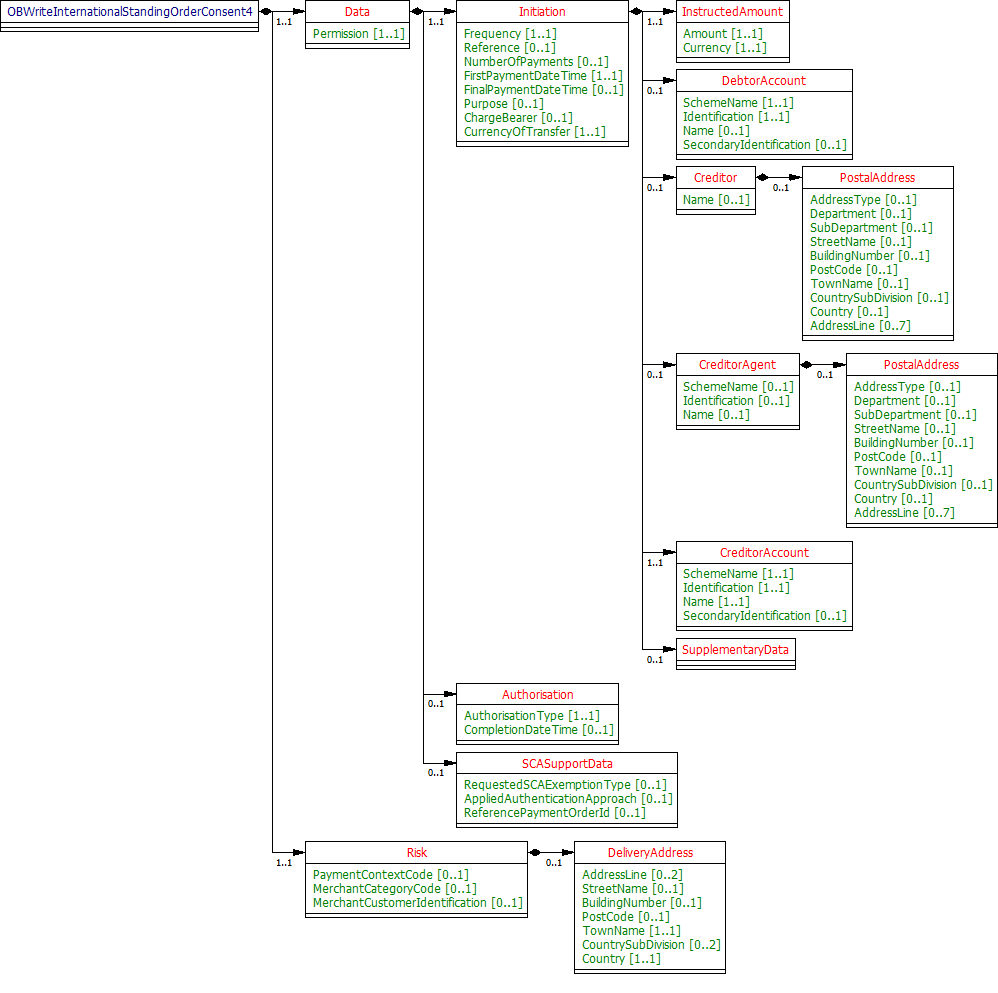
The OBWriteInternationalStandingOrderConsent4 object will be used for the call to:
- POST /international-standing-order-consents
UML Diagram
Notes
The international-standing-order-consent request contains these objects:
- Initiation
- Authorisation
- SCASupportData
- Risk
Data Dictionary
| Name | Occurrence | XPath | EnhancedDefinition | Class | Codes | Pattern |
|---|---|---|---|---|---|---|
| OBWriteInternationalStandingOrderConsent4 | OBWriteInternationalStandingOrderConsent4 | OBWriteInternationalStandingOrderConsent4 | ||||
| Data | 1..1 | OBWriteInternationalStandingOrderConsent4/Data | OBWriteDataInternationalStandingOrderConsent4 | |||
| Permission | 1..1 | OBWriteInternationalStandingOrderConsent4/Data/Permission | Specifies the Open Banking service request types. | OBExternalPermissions2Code | Create | |
| Initiation | 1..1 | OBWriteInternationalStandingOrderConsent4/Data/Initiation | The Initiation payload is sent by the initiating party to the ASPSP. It is used to request movement of funds from the debtor account to a creditor for an international standing order. | OBInternationalStandingOrder3 | ||
| Authorisation | 0..1 | OBWriteInternationalStandingOrderConsent4/Data/Authorisation | OBAuthorisation1 | |||
SCASupportData | 0..1 | OBWriteInternationalStandingOrderConsent4/Data/SCASupportData | Supporting Data provided by TPP, when requesting SCA Exemption. | OBSCASupportData1 | ||
| Risk | 1..1 | OBWriteInternationalStandingOrderConsent4/Risk | The Risk section is sent by the initiating party to the ASPSP. It is used to specify additional details for risk scoring for Payments. | OBRisk1 |
International Standing Order Consent - Response
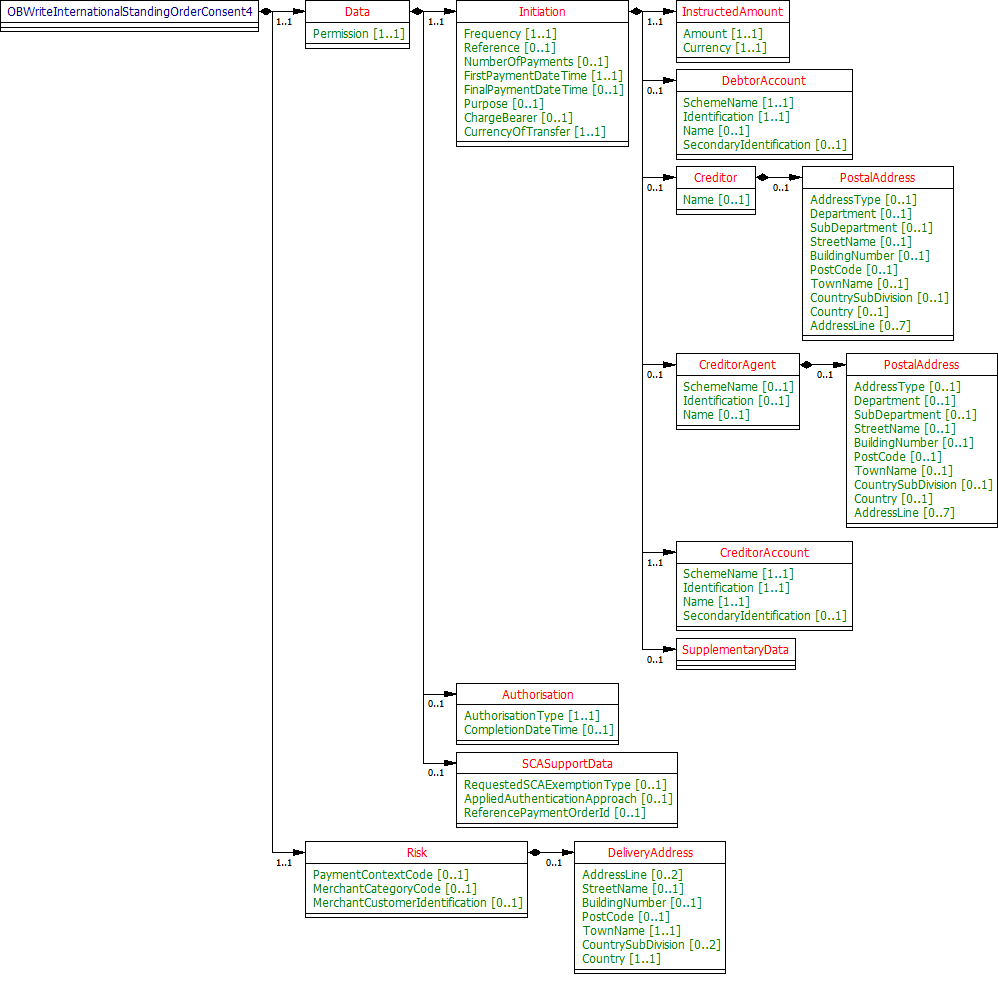
The OBWriteInternationalStandingOrderConsentResponse4 object will be used for a response to a call to:
- POST /international-standing-order-consents
- GET /international-standing-order-consents/{ConsentId}
UML Diagram
Notes
The international-standing-order-consent response contains the full original payload from the international-standing-order-consent request with the additional elements below:
- ConsentId.
- CreationDateTime the international-standing-order-consent resource was created.
- Status and StatusUpdateDateTime of the international-standing-order-consent resource.
- Permission field in the original request.
- CutOffDateTime Behaviour is explained in Payment Initiation API Specification, Section - Payment Restrictions -> CutOffDateTime API Behaviour.
- Charges array which will be used by the ASPSP to indicate charges, and the ChargeBearer as relevant.
Data Dictionary
| Name | Occurrence | XPath | EnhancedDefinition | Class | Codes | Pattern |
|---|---|---|---|---|---|---|
| OBWriteInternationalStandingOrderConsentResponse4 | OBWriteInternationalStandingOrderConsentResponse4 | OBWriteInternationalStandingOrderConsentResponse4 | ||||
| Data | 1..1 | OBWriteInternationalStandingOrderConsentResponse4/Data | OBWriteDataInternationalStandingOrderConsentResponse4 | |||
| ConsentId | 1..1 | OBWriteInternationalStandingOrderConsentResponse4/Data/ConsentId | OB: Unique identification as assigned by the ASPSP to uniquely identify the consent resource. | Max128Text | ||
| CreationDateTime | 1..1 | OBWriteInternationalStandingOrderConsentResponse4/Data/CreationDateTime | Date and time at which the resource was created. | ISODateTime | ||
| Status | 1..1 | OBWriteInternationalStandingOrderConsentResponse4/Data/Status | Specifies the status of resource in code form. | OBExternalConsentStatus1Code | Authorised AwaitingAuthorisation Consumed Rejected | |
| StatusUpdateDateTime | 1..1 | OBWriteInternationalStandingOrderConsentResponse4/Data/StatusUpdateDateTime | Date and time at which the resource status was updated. | ISODateTime | ||
| Permission | 1..1 | OBWriteInternationalStandingOrderConsentResponse4/Data/Permission | Specifies the Open Banking service request types. | OBExternalPermissions2Code | Create | |
| CutOffDateTime | 0..1 | OBWriteInternationalStandingOrderConsentResponse4/Data/CutOffDateTime | Specified cut-off date and time for the payment consent. | ISODateTime | ||
| Charges | 0..n | OBWriteInternationalStandingOrderConsentResponse4/Data/Charges | Set of elements used to provide details of a charge for the payment initiation. | OBCharge2 | ||
| Initiation | 1..1 | OBWriteInternationalStandingOrderConsentResponse4/Data/Initiation | The Initiation payload is sent by the initiating party to the ASPSP. It is used to request movement of funds from the debtor account to a creditor for an international standing order. | OBInternationalStandingOrder3 | ||
| Authorisation | 0..1 | OBWriteInternationalStandingOrderConsentResponse4/Data/Authorisation | OBAuthorisation1 | |||
SCASupportData | 0..1 | OBWriteInternationalStandingOrderConsentResponse4/Data/SCASupportData | Supporting Data provided by TPP, when requesting SCA Exemption. | OBSCASupportData1 | ||
| Risk | 1..1 | OBWriteInternationalStandingOrderConsentResponse4/Risk | The Risk section is sent by the initiating party to the ASPSP. It is used to specify additional details for risk scoring for Payments. | OBRisk1 |
International Standing Order - Request
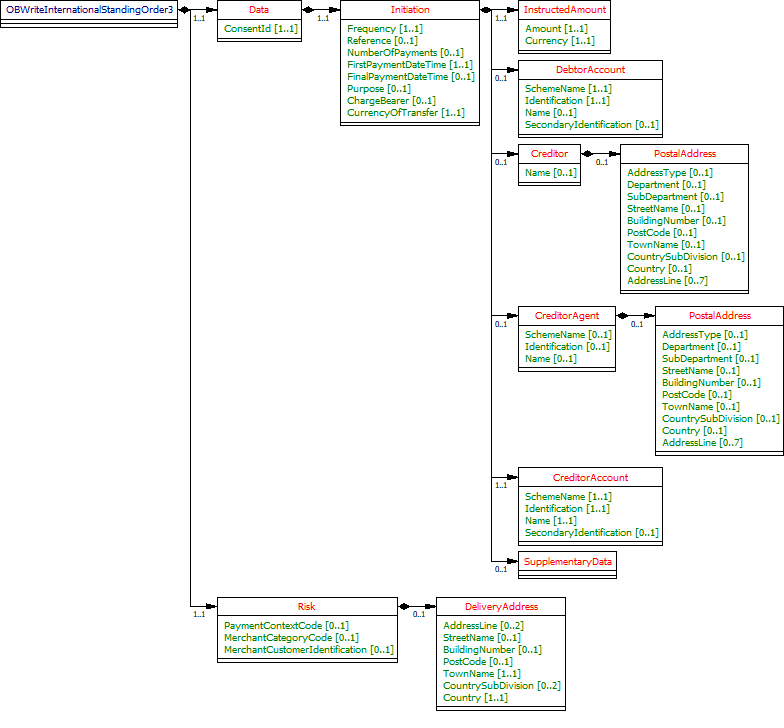
The OBWriteInternationalStandingOrder3 object will be used for a call to:
- POST /international-standing-orders
UML Diagram
Notes
The international-standing-orders request object contains the:
- ConsentId.
- The full Initiation and Risk objects from the international-standing-order-consent request.
The Initiation and Risk sections of the international-standing-orders request must match the Initiation and Risk sections of the corresponding international-standing-order-consent request.
Data Dictionary
| Name | Occurrence | XPath | EnhancedDefinition | Class | Codes | Pattern |
|---|---|---|---|---|---|---|
| OBWriteInternationalStandingOrder3 | OBWriteInternationalStandingOrder3 | OBWriteInternationalStandingOrder3 | ||||
| Data | 1..1 | OBWriteInternationalStandingOrder3/Data | OBWriteDataInternationalStandingOrder3 | |||
| ConsentId | 1..1 | OBWriteInternationalStandingOrder3/Data/ConsentId | OB: Unique identification as assigned by the ASPSP to uniquely identify the consent resource. | Max128Text | ||
| Initiation | 1..1 | OBWriteInternationalStandingOrder3/Data/Initiation | The Initiation payload is sent by the initiating party to the ASPSP. It is used to request movement of funds from the debtor account to a creditor for an international standing order. | OBInternationalStandingOrder3 | ||
| Risk | 1..1 | OBWriteInternationalStandingOrder3/Risk | The Risk section is sent by the initiating party to the ASPSP. It is used to specify additional details for risk scoring for Payments. | OBRisk1 |
International Standing Order - Response
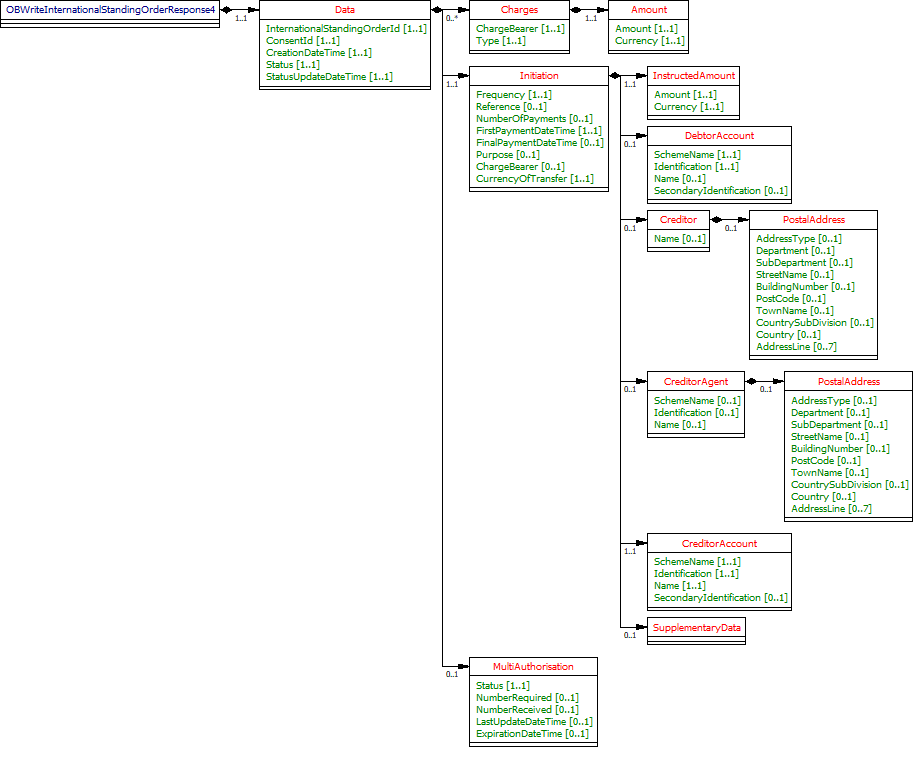
The OBWriteInternationalStandingOrderResponse4 object will be used for a response to a call to:
- POST /international-standing-orders
- GET /international-standing-orders/{InternationalStandingOrderPaymentId}
UML Diagram
Notes
The international-standing-orders response object contains the:
- InternationalStandingOrderPaymentId.
- ConsentId.
- CreationDateTime the international-standing-orders resource was created.
- Status and StatusUpdateDateTime of the international-standing-orders resource.
- The Charges in the international-standing-order-consent response from the ASPSP.
- The Initiation object from the international-standing-order-consent.
- The MultiAuthorisation object if the international-standing-order resource requires multiple authorisations.
Data Dictionary
| Name | Occurrence | XPath | EnhancedDefinition | Class | Codes | Pattern |
|---|---|---|---|---|---|---|
| OBWriteInternationalStandingOrderResponse4 | OBWriteInternationalStandingOrderResponse4 | OBWriteInternationalStandingOrderResponse4 | ||||
| Data | 1..1 | OBWriteInternationalStandingOrderResponse4/Data | OBWriteDataInternationalStandingOrderResponse4 | |||
| InternationalStandingOrderId | 1..1 | OBWriteInternationalStandingOrderResponse4/Data/InternationalStandingOrderId | OB: Unique identification as assigned by the ASPSP to uniquely identify the international standing order resource. | Max40Text | ||
| ConsentId | 1..1 | OBWriteInternationalStandingOrderResponse4/Data/ConsentId | OB: Unique identification as assigned by the ASPSP to uniquely identify the consent resource. | Max128Text | ||
| CreationDateTime | 1..1 | OBWriteInternationalStandingOrderResponse4/Data/CreationDateTime | Date and time at which the resource was created. | ISODateTime | ||
| Status | 1..1 | OBWriteInternationalStandingOrderResponse4/Data/Status | Specifies the status of resource in code form. | OBExternalStatus1Code | InitiationCompleted Cancelled | |
| StatusUpdateDateTime | 1..1 | OBWriteInternationalStandingOrderResponse4/Data/StatusUpdateDateTime | Date and time at which the resource status was updated. | ISODateTime | ||
| Charges | 0..n | OBWriteInternationalStandingOrderResponse4/Data/Charges | Set of elements used to provide details of a charge for the payment initiation. | OBCharge2 | ||
| Initiation | 1..1 | OBWriteInternationalStandingOrderResponse4/Data/Initiation | The Initiation payload is sent by the initiating party to the ASPSP. It is used to request movement of funds from the debtor account to a creditor for an international standing order. | OBInternationalStandingOrder3 | ||
| MultiAuthorisation | 0..1 | OBWriteInternationalStandingOrderResponse4/Data/MultiAuthorisation | OBMultiAuthorisation1 |
International Standing Order - Payment Details - Response
The OBWritePaymentDetailsResponse1 object will be used for a response to a call to:
- GET /international-standing-orders/{InternationalStandingOrderPaymentId}/payment-details
UML Diagram

Data Dictionary
Name | Occurrence | XPath | EnhancedDefinition | Class | Codes | Pattern |
|---|---|---|---|---|---|---|
| OBWritePaymentDetailsResponse1 | OBWritePaymentDetailsResponse1 | OBWritePaymentDetailsResponse1 | ||||
| Data | 1..1 | OBWritePaymentDetailsResponse1/Data | OBWriteDataPaymentOrderStatusResponse1 | |||
| PaymentStatus | 0..unbounded | OBWritePaymentDetailsResponse1/Data/PaymentStatus | Payment status details. | OBWritePaymentDetails1 |
Usage Examples
Create International Standing Order Consent
POST /international-standing-order-consents
POST /international-standing-order-consents HTTP/1.1
Authorization: Bearer 2YotnFZFEjr1zCsicMWpAA
x-idempotency-key: FRESCO.21302.GFX.20
x-jws-signature: TGlmZSdzIGEgam91cm5leSBub3QgYSBkZXN0aW5hdGlvbiA=..T2ggZ29vZCBldmVuaW5nIG1yIHR5bGVyIGdvaW5nIGRvd24gPw==
x-fapi-auth-date:  Mon, 01 Jan 2018 02:43:31 GMT
x-fapi-customer-ip-address: 104.25.212.99
x-fapi-interaction-id: 93bac548-d2de-4546-b106-880a5018460d
Content-Type: application/json
Accept: application/json

{
  "Data": {
	"Permission": "Create",
    "Initiation": {
	  "Frequency": "EvryWorkgDay",
	  "FirstPaymentDateTime": "2018-06-06T06:06:06+00:00",
	  "FinalPaymentDateTime": "2020-03-20T06:06:06+00:00",
	  "DebtorAccount": {
        "SchemeName": "UK.OBIE.SortCodeAccountNumber",
        "Identification": "11280001234567",
        "Name": "Andrea Frost"
      },
      "CreditorAccount": {
        "SchemeName": "UK.OBIE.IBAN",
        "Identification": "DE89370400440532013000",
        "Name": "Tom Kirkman"
      },
	  "InstructedAmount": {
        "Amount": "20",
        "Currency": "EUR"
	  },
	  "CurrencyOfTansfer":"EUR"
    }
  },
  "Risk": {
    "PaymentContextCode": "PartyToParty"
  }
}
POST /international-standing-order-consents response
HTTP/1.1 201 Created
x-jws-signature: V2hhdCB3ZSBnb3QgaGVyZQ0K..aXMgZmFpbHVyZSB0byBjb21tdW5pY2F0ZQ0K
x-fapi-interaction-id: 93bac548-d2de-4546-b106-880a5018460d
Content-Type: application/json


{
  "Data": {
	"ConsentId": "ISOC-100",
	"CreationDateTime": "2018-01-01T06:06:06+00:00",
	"Status": "AwaitingAuthorisation",
	"StatusUpdateDateTime": "2018-01-01T06:06:06+00:00",
	"Permission": "Create",
    "Initiation": {
	  "Frequency": "EvryWorkgDay",
	  "FirstPaymentDateTime": "2018-06-06T06:06:06+00:00",
	  "FinalPaymentDateTime": "2020-03-20T06:06:06+00:00",
      "DebtorAccount": {
        "SchemeName": "UK.OBIE.SortCodeAccountNumber",
        "Identification": "11280001234567",
        "Name": "Andrea Frost"
      },
      "CreditorAccount": {
        "SchemeName": "UK.OBIE.IBAN",
        "Identification": "DE89370400440532013000",
        "Name": "Tom Kirkman"
      },
	  "InstructedAmount": {
        "Amount": "20",
        "Currency": "EUR"
	  },
	  "CurrencyOfTansfer":"EUR"
    }
  },
  "Risk": {
    "PaymentContextCode": "PartyToParty"
  },
  "Links": {
    "Self": "https://api.alphabank.com/open-banking/v3.1/pisp/international-standing-order-consents/ISOC-100"
  },
  "Meta": {}
}
Create an International Standing Order
POST /international-standing-orders request
POST /international-standing-orders HTTP/1.1
Authorization: Bearer eYJQLMQLMQLM
x-idempotency-key: FRESNO.1317.GFX.22
x-jws-signature: TGlmZSdzIGEgam91cm5leSBub3QgYSBkZXN0aW5hdGlvbiA=..T2ggZ29vZCBldmVuaW5nIG1yIHR5bGVyIGdvaW5nIGRvd24gPw==
x-fapi-auth-date:  Mon, 01 Jan 2018 02:43:31 GMT
x-fapi-customer-ip-address: 104.25.212.99
x-fapi-interaction-id: 93bac548-d2de-4546-b106-880a5018460d
Content-Type: application/json
Accept: application/json

{
  "Data": {
	"ConsentId": "ISOC-100",
    "Initiation": {
	  "Frequency": "EvryWorkgDay",
	  "FirstPaymentDateTime": "2018-06-06T06:06:06+00:00",
	  "FinalPaymentDateTime": "2020-03-20T06:06:06+00:00",
	  "DebtorAccount": {
        "SchemeName": "UK.OBIE.SortCodeAccountNumber",
        "Identification": "11280001234567",
        "Name": "Andrea Frost"
      },
      "CreditorAccount": {
        "SchemeName": "UK.OBIE.IBAN",
        "Identification": "DE89370400440532013000",
        "Name": "Tom Kirkman"
      },
	  "InstructedAmount": {
        "Amount": "20",
        "Currency": "EUR"
	  },
	  "CurrencyOfTansfer":"EUR"
    }
  },
  "Risk": {
    "PaymentContextCode": "PartyToParty"
  }
}
POST /international-standing-orders response
HTTP/1.1 201 Created
x-jws-signature: V2hhdCB3ZSBnb3QgaGVyZQ0K..aXMgZmFpbHVyZSB0byBjb21tdW5pY2F0ZQ0K
x-fapi-interaction-id: 93bac548-d2de-4546-b106-880a5018460d
Content-Type: application/json

{
  "Data": {
    "InternationalStandingOrderId": "SO-ISOC-100",
    "ConsentId": "ISOC-100",
    "CreationDateTime": "2018-01-01T06:06:36+00:00",
    "Status": "InitiationCompleted",
    "StatusUpdateDateTime": "2018-01-01T06:36:06+00:00",
    "Initiation": {
      "Frequency": "EvryWorkgDay",
      "FirstPaymentDateTime": "2018-06-06T06:06:06+00:00",
      "FinalPaymentDateTime": "2020-03-20T06:06:06+00:00",
      "DebtorAccount": {
        "SchemeName": "UK.OBIE.SortCodeAccountNumber",
        "Identification": "11280001234567",
        "Name": "Andrea Frost"
      },
      "CreditorAccount": {
        "SchemeName": "UK.OBIE.IBAN",
        "Identification": "DE89370400440532013000",
        "Name": "Tom Kirkman"
      },
      "InstructedAmount": {
        "Amount": "20",
        "Currency": "EUR"
      },
      "CurrencyOfTansfer":"EUR"
    }
  },
  "Risk": {
    "PaymentContextCode": "PartyToParty"
  },
  "Links": {
    "Self": "https://api.alphabank.com/open-banking/v3.1/pisp/international-standing-orders/SO-ISOC-100"
  },
  "Meta": {}
}
© Open Banking Limited 2019 | https://www.openbanking.org.uk/open-licence | https://www.openbanking.org.uk